Preface
InfoRec2, in conjunction with the DB2 catalog, perform control of all data sets associated with the DB2 recovery.
It provides a way to perform these tasks:
-
to create image copies of a tablespace or a set of tablespaces,
-
to create incremental image copies,
-
to purge, in coordination with the DB2 catalog, recovery files that are no longer necessary:
-
image copy
-
incremental
-
log
-
This document applies to users who want to implement InfoRec2.
It assumes that InfoRec2 has been installed according to the procedure described in the installation manual HR104.
INFO-RECOVERY
INFO-RECOVERY is composed of four complementary and independent software packages:
-
InfoRec1
InfoRec1 supervises, along with DBRC, all data sets associated with IMS recovery:
-
image copy
-
change accum
-
log
-
-
InfoRec2
InfoRec2 supervises, along with the DB2 catalog, all data sets associated with DB2 recovery:
-
image copy
-
incremental image copy
-
log
-
-
InfoVic1
InfoVic1 includes all functions associated with IMS recovery:
-
application checkpoint
-
IMS automatic operator
-
physical recovery
-
application recovery to a checkpoint
-
"MAP" of the activity
-
-
InfoVic2
InfoVic2 includes all functions associated with DB2 recovery:
-
applicative checkpoints
-
DB2 automatic operator
-
physical recovery
-
application recovery to a checkpoint
-
"MAP" of the activity
-
The combination of InfoVic1 and InfoVic2 mixes DB2 and IMS checkpoints and repositions IMS databases and DB2 tablespaces to these checkpoints.
General Description
INFO-RECOVERY is a RECOVERY control automaton that generates JCL and controls its execution.
It executes under TSO-ISPF and uses ISPF tables and skeletons.
The JCL is generated under specific conditions:
-
according to the user requirements that specify:
-
the function to execute
-
the subsystem (IMS and/or DB2) on which it has to be applied
-
the databases to process
-
the execution parameters
-
-
according to a default parameter library: the parmlib;
The user can also act on the JCL generation:
-
by requesting the execution of CLIST or REXX procedures,
-
by providing its own generation skeletons.
The generated JCL can be saved in a file or submitted directly by INFO-RECOVERY.
In this case, the generator job of the JCL will be called "GENERATING JOB", the current step of the generating job will be called "MOTHER STEP", and the submitted job will be called "GENERATED JOB".
The generating job can control the execution of the generated job. It can wait until the end of the execution of the generated job to continue its own execution (see Generated Job Control). In this case, the good or bad execution of the generated job will provoke the good or bad execution of the mother step.
The control of the execution allows for the execution of image copy at the beginning of an application job, and for the continued execution of the application job only when the image copy is executed.
The sequence of INFO-RECOVERY operations is explained in paragraph: Execution.
PARMLIB
The PARMLIB is essential to INFO-RECOVERY. The PARMLIB contains these components:
-
JCL generation skeletons,
-
Description of the IMS or DB2 site see the Installation Guide of INFO-RECOVERY, HR104,
-
Default processing parameters for various functions,
-
Standard CLIST of the product,
-
ISPF panels,
-
Members that allow execution of SQL statements.
InfoRec
The InfoRec component is common to all INFO-RECOVERY software.
It includes services and general utilities.
-
The INFO-RECOVERY software installation: see HR104 reference manual.
-
The INFO-RECOVERY functions execute in batch mode as well as under ISPF-TP through InfoRec:
In batch mode, only an EXEC card and a SYSIN card are necessary. Under ISPF-TP, the call is made by a simple SELECT PGM with no modification of the logon procedures. Issuing modes in batch and under ISPF-TP are explained in paragraphs BATCH Execution and Execution under TSO/ISPF.
-
Management of the different environments. It is possible to manage different environments and to chain them in order to create a hierarchy to receive the new versions of the software. See manual HR104.
Execution
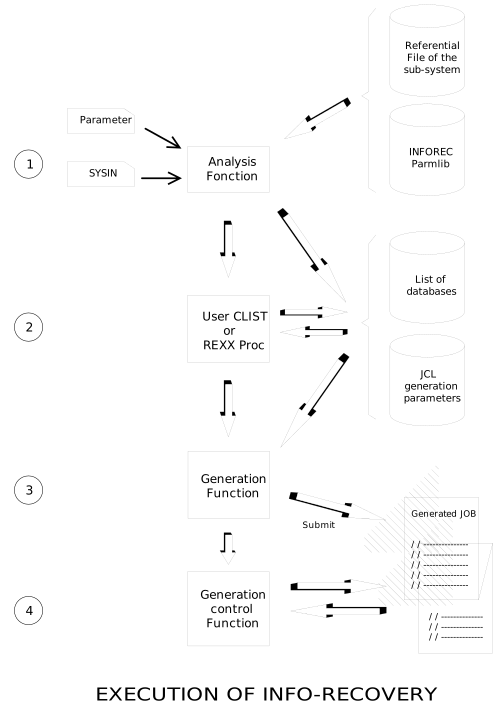
Whatever the executed INFO-RECOVERY software is, the operating mode is always identical:
-
Request analysis and JCL generation parameter preparation.
-
Identify the requested function and the subsystem (IMS and/or DB2) on which it has to run.
For example, perform image copy on all the tablespaces of the DB2 "DB2P".
-
Create the list of databases to process:
Identify databases named in SYSIN, accessing the reference file of the subsystem (RESLIB for IMS and/or the catalog for DB2),
-
Identify the function parameters.
They specify JCL generation parameters. For example, execute an image copy on disc or on tape.
-
-
Execution of CLIST or REXX procedures of the site
They allow the modification of the list of objects and generation parameters.
-
Skeletons inclusion and generation of JCL and/or sysin of utilities that will insure the execution of the requested function,
-
JCL submitting or dynamic call of the function, and controlled execution of the function or the JCL.
The operating mode of INFO-RECOVERY can be schematized as follows:
BATCH Execution
In batch mode as well as in interactive, the execution of INFO-RECOVERY is requested by the call of the module CSXEXEC.
In batch mode, the necessary JCL is the following:
//S1 EXEC PGM=CSXEXEC,DYNAMNBR=50,REGION=2M,
// PARM=(FUNCTION,\'Funcname\'\[,Name,\'Value\'\])
//SYSIN DD *
Parameters of the requested function
When executed in batch mode, the module CSXEXEC receives two types of parameters:
-
The execution parameter defines the function to execute
-
The SYSIN file specifies on what databases to execute the function and detailed parameters of the function.
Parameters
CSXEXEC receives a succession of (Name,Value) pairs, where Name is the name of a variable and Value its value. The value has to be coded between apostrophes.
Expected variables follow:
{wrapper="1" role="DL"}
-
FUNCTION
This parameter is mandatory; it specifies the name of the function to execute: CS1VIC, CS1IC, etc....
-
IMSID
This parameter is optional; it specifies the IMS subsystem on which the function will execute. The subsystem has to be defined in parmlib member IMSIDS.
For a data sharing environment, the name of the IMS group can be specified. The group of IMSs must have been defined in member IMSDSGS of the PARMLIB.
If this parameter is omitted, INFO-RECOVERY will work on the default IMS subsystem (as defined in parmlib member SYSIDS). The special value IMSID,'NONE' allows for skipping all IMS-related allocations; it may only be used for mixed DL1/DB2 functions for those executions in which only DB2 selection parameters are entered.
-
DB2ID
This parameter is optional; it specifies the DB2 subsystem on which the function will execute. The subsystem has to be defined in parmlib member DB2IDS.
You may specify the name of the DB2 group if data sharing is used on your site. If such is the case, the DB2 group must have been defined in member DB2DSG of the PARMLIB. INFO-RECOVERY will select the DB2 sub-system (inside the group) according to the system where the execution takes place.
If this parameter is omitted, INFO-RECOVERY will work on the default DB2 subsystem (as defined in parmlib member SYSIDS). The special value DB2ID,'NONE' allows for skipping all DB2-related allocations; it may only be used for mixed DL1/DB2 functions for those executions in which only IMS selection parameters are entered.
-
DEBUG
This parameter is optional. If any problem occurs, the DEBUG function allows the user to trace the Clist (or REXX) procedures, the INFO-RECOVERY skeletons, and the commands passed to the subsystem (IMS/DB2). Values: 'Y' or 'N' (default).
The example below shows the execution of a FULL IMAGE COPY (CS1FIC function) on the DB2 DB2E:
 //S1      EXEC PGM=CSXEXEC,DYNAMNBR=50,REGION=2M,
 //             PARM=(FUNCTION,'CS1FIC',DB2ID,'DB2E')
 //SYSIN   DD *
  Parameters of the CSIFIC function
Execution of an IMS image copy processing on the default IMS, with tracing of Clist and IMS commands.
 //S1      EXEC PGM=CSXEXEC,DYNAMNBR=50,REGION=2M,
 //             PARM=(FUNCTION,'CS1IC',DEBUG,'Y')
 //SYSIN     DD *
  Parameters of the CS1IC function
SYSIN
The SYSIN file specifies variables that will manage the execution of the requested function:
-
Indication variables:
On what databases and/or what tablespaces the function must be executed?
-
Execution variables:
How the function has to be executed?
Format
The SYSIN sets variables with the following syntax:
VARIABLE=value
note
The character '*' in column 1 indicates a comment.
note
The blank character (' ') after the value indicates that the rest of the line is a comment.
note
The name of the variable must not begin in column 1. First column is reserved for the label followed by a blank.
note
A comma (',') behind the value of a variable connects the variable to the next variable and creates groups of variables. There will be as many executions of the function as there are groups of variables.
note
It is easier to read the SYSIN when starting the line with the indication variable: variable "DB" for IMS and variables "TS" and "DBSET" for DB2.
The different execution variables and the associated syntax are described in chapters covering each function.
Default Values
It is not necessary to systematically enter all execution variables of a function into the Sysin:
For each INFO-RECOVERY function, a member of the same name is associated in the parmlib library.
It has the same syntax as the SYSIN file.
It contains the definition of all variables necessary for the execution of the function.
It sets the default customization of the function for the site. (see: Customizing INFO-RECOVERY).
The example below shows the execution of a FULL IMAGE COPY (function CS1FIC) of tablespaces from the DB2 DB2E and which name starts with CLI:
 //S1      EXEC PGM=CSXEXEC,DYNAMNBR=50,REGION=2M,
 //             PARM=(FUNCTION,'CS1FIC',DB2ID,'DB2E')
 //SYSIN   DD *
  TS=(CLI*)
In this example, no execution parameter was specified. The values found in member CS1FIC of the Parmlib will be used.
User Variables
User variables can also be specified in SYSIN and can also be used in REXX procedures (or CLIST) or in user skeletons (see: User Variables).
The Other Data Sets
Below is the list of optional DD cards and their use:
CSXPRINT
Checking the printing of messages. By default they are dynamically sent to SYSOUT=*.
CSXPLIB
Using a PARMLIB other than the default parmlib. The example below illustrates a VIC JCL where the parmlib has been forced:
 //S1      EXEC PGM=CSXEXEC,DYNAMNBR=50,REGION=2M,
 //             PARM=(FUNCTION,'CS1VIC',IMSID,'IMST')
 //CSXPLIB DD   DSN=INFOREC.V1R0.CSBPLIB,DISP=SHR
 //SYSIN   DD   *
   DB=(DBCLI*),ID=CLI01             <===... vic client database
CSXULIB
To add a user parmlib (see: User Configuration under ISPF/TP). The use of CSXULIB redefines ISPF objects used by the software and the default customization of the function. A member of the parmlib is then "masked" by a member with the same name existing in the user library.
The example below illustrates a RECOV JCL where a user library has been added:
 //S1      EXEC PGM=CSXEXEC,DYNAMNBR=50,REGION=2M,
 //             PARM=(FUNCTION,'CS1RECOV',IMSID,'IMST')
 //CSXULIB   DD DSN=userid.INFOREC.USERLIB,DISP=SHR
 //SYSIN     DD *
   DB=(DBCLI*),ID=CLI01,TEST=Y      <===... test of recovery
JCLOUT
All functions that generate JCL accept a TEST= parameter, allowing to print (TEST=Y) or to submit (TEST=N) the generated JCL. It is possible to write the generated JCL into a data set instead of submitting it by adding a JCLOUT DD statement.
The example below illustrates a JCL of RECOV where the submit has been routed to the library specified in JCLOUT:
 //S1      EXEC PGM=CSXEXEC,DYNAMNBR=50,REGION=2M,
 //             PARM=(FUNCTION,'CS1RECOV',IMSID,'IMST')
 //JCLOUT    DD DSN=userid.INFOREC.JCLOUT(MYRECOV),DISP=SHR
 //SYSIN     DD *
   DB=(DBCLI*),ID=CLI01,TEST=N    <===... Recov JCL copied to JCLOUT
Execution under TSO/ISPF
As for the batch mode, the CSXEXEC module initializes the INFO-RECOVERY environment.
In CLIST, the starting command is the following:
ISPEXEC SELECT PGM(CSXEXEC) NEWAPPL(CSX)
Inside a menu, the starting is requested as follows:
&ZSEL = 'PGM(CSXEXEC) NEWAPPL(CSX)'
The execution of one of the two previous commands results in the display of the main INFO-RECOVERY menu:
INFO-RECOVERY - Primary Panel
COMMAND ===\>
1 INFOREC1 - Control DL1 recovery files
2 INFOREC2 - Control DB2 recovery files
V INFOVIC - IMS/DB2 data recovery
C CONFIG - User Profile Configuration
E EDIT - Edit current parmlib
P PARMLIB - Parmlib Management
T TERMINAL - Display logical terminal
J JOBS - Submitted jobs log
I INSTALL - Installation functions
N NOTES - Show INFO-RECOVERY changes
Available options:
-
InfoRec1, control of IMS recovery data sets, is described in the InfoRec1 User Manual: HR101,
-
InfoRec2, control of DB2 recovery data sets, is described in the InfoRec2 User Manual: HR102,
-
InfoVic1 and InfoVic2, execution of the DB2 and IMS recovery, are described in the HR103 User Manual,
-
Option C (configuration), allows the ISPF user to define its own environment: which IMS or DB2 to execute functions,...
This option is described in annex: User Configuration under ISPF/TP.
-
Option E (edit) allows access to EDIT the current PARMLIB and to modify default parameters.
-
Option P (parmlib) and option I (installation) are described in the Installation Manual HR104.
-
Option T (terminal) accesses the logical terminal that draws all function executions and associated sysouts. It is described in paragraph Logical Terminal.
-
Option J (jobs) accesses the list of jobs submitted under the control of an INFO-RECOVERY session.
-
Option N allows viewing of product modifications.
Customizing INFO-RECOVERY
All functions of INFO-RECOVERY are managed by ISPF variables. Associated with the ISPF skeletons, they generate the JCL for each function.
INFO-RECOVERY uses three types of variables:
-
System variables,
-
Site variables,
-
Function variables;
INFO-RECOVERY allows the use of a fourth type of variable: user variables.
Depending on their type, variables can be found in these locations:
-
Within call parameters of CSXEXEC in batch mode or user configuration in interactive mode
-
Within information provided during the call:
SYSIN File in batch mode or function screen in interactive mode;
-
In the parmlib library,
-
Or directly generated by INFO-RECOVERY.
If a variable is specified both in SYSIN and PARMLIB, the value specified in SYSIN will be used.
If a variable is specified neither in SYSIN nor in PARMLIB, INFO-RECOVERY will use its own defaults.
System Variables
System variables are non-updatable variables that are generated automatically during each execution. They cannot be specified in the user parmlib or in the SYSIN file.
Example: variable HHMMSSD that is used for the generation of an image copy dsname. This variable contains the execution timestamp specified in tenth of seconds.
The list of system variables and their meaning is described in paragraph: System Variables.
Site Variables
Site variables define to INFO-RECOVERY the site's execution configuration and general conditions.
Their values can be specified in call parameter, in the SYSIN file or in the parmlib of INFO-RECOVERY.
6 members of the parmlib provide variables for the site:
-
SYSIDS describes all MVS systems using the products
-
IMSIDS describes IMS systems using the products
-
DB2IDS describes DB2 systems using the products
-
PRODUCTS describes installed products
-
CUSTOM describes the global INFO-RECOVERY customization
-
CTRLRUN checks the status of batch CSXEXEC
The format of these members is described in the Appendix. Modification rules are detailed in the Installation Manual HR104.
Function Variables
Function variables are used to specify execution parameters of a function.
Their values can be specified in the SYSIN file or in the parmlib of INFO-RECOVERY in a member having the same name as the function.
Several variables are associated with each function. They are described in chapters that explain the function.
The user is informed about the:
-
indication variables
-
execution variables
After the first installation, parmlib members associated with functions contain a customization adapted to the most frequent use of INFO-RECOVERY and they only need to be modified for sophisticated tests (see adjustment paragraphs and complements for each function).
During re-installations or further upgrades, the customization is preserved and the new parameters are automatically added. This modification is dated. The list of all members that have been automatically modified may be viewed with the option 'Note' on the main INFO-RECOVERY menu.
User Variables
User variables can be entered into the SYSIN file or in the parmlib member corresponding to the function.
These variables may be used by ISPF skeletons and REXX procedures (CLIST).
The example below illustrates the execution of a RECOVERY (function CS1RECOV) of IMS IMST databases which name begins with DBX, and specifies the user parameter USERDEST (this parameter is supposed to allow the routing of sysouts to a particular printer).
 //S1      EXEC PGM=CSXEXEC,DYNAMNBR=50,REGION=2M,
 //             PARM=(FUNCTION,'CS1RECOV',IMSID,'IMST')
 //SYSIN     DD *
   DB=(DBX*),USERDEST=rmt27
Calling User Procedures
As indicated previously in paragraph Execution, INFO-RECOVERY allows the execution of user REXX or CLIST procedure.
Corresponding members can be found in the PARMLIB or in a library declared in the member SYSIDS of the parmlib (variable SYSPROC or SYSEXEC).
The calling mode of these procedures is specified in Calling User Procedures.
Generated Job Control
JOB Card
It is possible to determine the JOBNAME and other characteristics of the JOB generated by modifying generation variables of the JOB card.
It is built using the standard clist JOBCARD, the member CUSTOM of the parmlib, and the ISPF skeleton CSKJOBC (parmlib). It is also possible to redefine its own JOB card by copying this last member in a declared user library. The copy will then 'mask' the original item (see the Installation Manual of INFO-RECOVERY HR104).
The example below illustrates all control options:
 //S1      EXEC PGM=CSXEXEC,DYNAMNBR=50,REGION=2M,
 //             PARM=(FUNCTION,'CS1FIC',DB2ID,'DB2E')
 //SYSIN     DD *
   TS=CATALOG,TEST=N,           <===... Full Image Copy
     JOBNAME=MYJOB,                 ... jobname
     CLASS=A,                       ... job CLASS
     MSGCLASS=X,                    ... MSGCLASS
     TYPRUN=SCAN,                   ... TYPRUN
     USER=userid,                   ... USER
     PSW=password,                  ... user PSW
     NTUSER=userid,                 ... NOTIFY
     ACCOUNT=account                ... ACCOUNT
Checking the Execution
Jobs submitted by INFO-RECOVERY functions may be checked using option JOBCHECK=Y/N. The default value of this option is specified in the CUSTOM member of the parmlib. This option may be specified at any time by adding the jobcheck= parameter prior to the execution of a function.
When job control is requested, the request ensures that all generated jobs will be finished before it ends. Therefore, the work may be checked as a single task. If one of the generated jobs abends, the request also abends to report the problem. (see "RC" to issue a return code instead of an abend 4001).
When executing an INFO-RECOVERY function in batch mode, the maximum waiting time for the start is specified using option JOBQTIME=(HHMM). The default value of this option and the period of the waiting cycle JOBWAIT=(seconds) are specified in the CUSTOM member. If the delay has expired, the job is PURGED. If the job starts, it will run until it ends (normal or abend).
When leaving the ISPF panels of INFO-RECOVERY, the product will purge all QUEUED jobs (keep the RUNNING jobs). If you return to INFO-RECOVERY before the end of these jobs, INFO-RECOVERY will recognize the jobs. If not, their status will be UNKNOWN.
A generated job with the option JOBCHECK=Y will abend if the generating job is missing or has been purged.
The status of the submitted job may be any of these:
-
QUEUED- The job is waiting for its execution.
-
RUNNING- The job is active.
-
ENDED- The job is over.
-
ABENDED- The job abended.
-
UNKNOWN- The job status is unknown. Case of the active jobs left by the generating job.
-
PURGED- The waiting job has been deleted as a result of the deletion of the request. In this case, the selected job will detect that the waiting job is missing and will issue its own purge.
Under ISPF, it is possible to directly access SDSF for a specific job using selection code S.
Execution Results
When executing CSXEXEC in batch mode, the following abends can be issued:
-
ABEND 4001 in case of an incorrect execution of the CSXEXEC function, or an ABEND 4002 in case of
-
ABEND 4002 in case of a system abend (non-ISPF)
-
ABEND 4003 in case of an ISPF error.
Carefully examine the execution report to find the messages explaining the reason for the error.
The user may also request to issue a return code instead of an abend 4001 bu specifying the parameter RC= in the member CUSTOM of the parmlib (for all batch executions) or in SYSIN (for a specific execution). The default value of the RC= parameter is 0 (no conversion).
InfoRec2 - DB2 Physical Recovery
Select option 2 from the general menu of INFO-RECOVERY to display the menu of InfoRec2:
INFOREC2 - Primary Panel
COMMAND ===\>
1 FIC - Full Image Copy of one or more TS(s)
2 IIC - Incremental Image Copy of one or more TS(s)
3 MERGE - Merge Image Copies
4 DELETE - Delete obsolete recovery objects
for one or more TS(s)
5 MDISK - List/Migrate/Delete of one or more Dataset(s)
InfoRec2 includes the following functions:
-
CS1FIC, for full image copies
-
CS1IIC, for incremental image copies
-
CS1MERGE, for merging image copies
-
CS1DLET2, for purges
-
CS1MDSK2, for management of disk space
These functions are described in the following chapters.
CS1FIC - Full Image Copy
Purpose
The CS1FIC function automatically prepares Full Image Copies for one or more tablespaces, and, if using DB2 Version 6, for one or more indexspaces. . The CS1FIC function is asynchronous and semi-independent from application scheduling: its execution and that of applications using the same tablespaces are mutually exclusive.
Tablespaces for backup processing are found either using the XPROC procedure CSRTSPRT in the current parmlib, that uses SQL to read the DB2 catalog, or using direct VSAM access to the DB2 catalog (see Consulting the DB2 Catalog). Their availability is checked with a -DISPLAY command; the execution may be stopped (according to the FLUSH parameter) if the current state of a tablespace does not allow to copy it; otherwise, JCL is generated using the CSRFIC procedure.
Indexspaces to be saved are found using the CSRIXPRT and CSRIXPR2 (XPROC) procedures from the current parmlib. These procedures check the DB2 catalog. We strongly recommend to create a user index on the DBNAME/TSNAME columns of the SYSIBM.SYSTABLES tablein order to obtain a correct performance for SQL queries.
The user should define a frequency to back up tablespaces for each application (e.g. once a week), and schedule the triggering of the function, using the job management system. Use of generic specifications and the triggering of the function by the job management system ensure that tablespaces will be backed up correctly and on a regular basis.
In the case of disk image copy, the CS1FIC function generates allocation parameters of the image copy file according to the effective size of the tablespace.
The TS=CATALOG option provides Full Image Copy JCL for all tablespaces of the DB2 catalog in the correct order. CATALOG is a special value. Indeed, some tablespaces are not referenced in the SYSTABLESPACE catalog table and cannot be selected by a generic command (DSNDB01 tablespaces).
The CS1FIC function also generates dual image copies and image copies (primary and dual) intended for the DB2 recovery subsystem.
Syntax
The variables used to execute the CS1FIC function are described below.
The user can request the modification of default values of the function by modifying member CS1FIC of the parmlib.
* Comment.
TS=(criterion,.), TS search criteria (generic or specific)
EXTS=(criterion,..), EXTS exclusion criteria
IX=(criterion,.), IX search criteria (generic or specific)
DBSET=dbset, A database search restriction (SQL syntax).
AUTHID=authid, A creator search restriction (SQL syntax).
TEST=Y/N, Print (Y, def) or submit (N)
* the generated JCL.
DISPLAY=Y/N, Display the result of the search.
FLUSH=Y/N/W, Stop (Y, def) the execution or not
* if an error is found or delete the un-
* available ts and continue the execution
IXALL=Y/N, To include the IX that belong to the
* selected TS
PROC=proc, The name of the XPROC procedure used.
LPRIM=TAPE/DISK/NONE, Local Primary FIC
LDUAL=NONE/TAPE/DISK, Local Dual FIC
RCPRIM=NONE/TAPE/DISK, Primary Recovery FIC
RCDUAL=NONE/TAPE/DISK, Dual Recovery FIC
SHRLEVEL=shrlevel, shrlevel of the FIC : REFERENCE/CHANGE
CHECKPG=Y/N, use of the COPY CHECKPAGE option
PARALLEL=n, maximum number of objects to be processed
* in parallel
DSSEL=dssel, A tablespace partition selector.
DFSMS=Y/N, Creation of the concurrent image copy
AUTO=Y/N, The FIC automatic option
MODE=mode, The FIC automatic mode: UTILITY/DISPLAY
* AOPoption=, Any AOP such as: WAIT=, FAILED=, etc\...
MAXCYLS=, Maximum number of cylinders of a disk FIC
DVOL=dvol, Specific volume for local primary disk FIC
TUNIT=tunit, The unit group of tape FIC datasets.
DUNIT=dunit, The unit group of disk FIC datasets.
DTYPE=dtype, Type of DASD for the disk FICs
USP=usp, Default unit of space of disk FIC datasets.
PSP=psp, Default primary space of disk FIC datasets.
SSP=ssp, Default secondary space of disk FIC datasets.
*
Uservariable= Any extra user variable as=\"\...\" A title
* Comment.
TS=(criterion, ), next set of parameters
\...
{wrapper="1" role="DL"}
-
TS=(criterion,..)
TS= specifies a list of tablespace names patterns. Tablespaces referenced in the DB2 catalog whose name matches one of the patterns are included in the list of tablespaces on which the requested function is to be performed.
Precisely:
-
A name pattern means a generic name according to SQL LIKE syntax: special characters are the percent sign % and the underscore sign _; additionally, an asterisk * is transformed into a % sign.
-
For a pattern in the form dbname.tsname, tablespaces selected are those whose database name matches the dbname pattern, whose name matches the tsname pattern and whose creator's name matches the AUTHID pattern.
-
For a pattern in the form tsname, tablespaces selected are those whose database name matches the DBSET pattern, whose name matches the tsname pattern and whose creator's name matches the AUTHID pattern.
-
If TS=CATALOG is specified, the function will be performed on catalog tablespaces.
-
If TS=% or TS=* is specified, no catalog tablespace will be selected.
-
The database name often occurs as the first index column on catalog tables read by the function. Therefore, better performance in reading from the DB2 catalog will be achieved if the database name pattern is specified with as much precision as possible, either through the DBSET parameter, or through the qualifier in a list item of the form dbname.tsname.
-
EXTS=(criterion,.)
specifies a list of tablespaces to be excluded from processing. The EXTS parameter has the same syntax then the TS parameter and allows you to exclude certain tablespaces from the list that has been obtained by using the TS parameter.
The EXTS parameter is ignored in case of TS=CATALOG.
Default: NONE
-
IX=(criterion,...
Specifies a list of indexspaces to be saved. The IX parameter works exactly the the same way as the TS parameter but only for indexes defined in COPY=Y in the DB2 catalog.
-
DBSET=dbset
DBSET= is used as a default dbname pattern for each item in the list TS= in the form tsname; see the description of TS= parameter. Default parameter: %
-
AUTHID=authid
AUTHID= is used as a creator's name pattern for each item in the list TS=; see the description of TS= parameter. Default parameter: %
-
DISPLAY=Y/N
DISPLAY= lists on SYSOUT the selected databases and tablespaces.
Default parameter: N
-
FLUSH=Y/N/W
FLUSH= determines the action the function will take whenever the current state of a selected tablespace does not make it eligible for COPY:
-
Abend 4001 if FLUSH=Y,
-
Exclusion from the final selection of the unavailable tablespace if FLUSH=N: execution proceeds.
-
RC=4: delete of the tablespace that is unavailable from the selection and continuation of the execution.
Default parameter: Y
-
-
IXALL=Y/N
To automatically include the indexspaces (defined as COPY=Y in the DB2 catalog) that belong to the tables of the list of the selected tablespaces.
Default parameter: N
-
PROC=proc
PROC= is the name of the standard XPROC procedure for the FIC function. A user procedure may be used.
Default parameter: CSRFIC
-
LPRIM=
LPRIM= is the main action to take relative to primary local image copies.
-
TAPE requests the creation of primary local image copies on tape.
In the case of primary local image copy on tape, and if the request processes several tablespaces, the generated JCL will specify a multi-file (or multi-volume) tape output for primary local image copies.
-
DISK requests the creation of primary local image copies on disk.
-
NONE requests that no primary local image copy be created.
-
Default parameter: TAPE if the creation of image copy for the DB2 recovery subsystem is not requested; NONE if the creation of image copy for the DB2 recovery subsystem is requested.
-
LDUAL=
LDUAL indicates the action to be taken for to dual local image copies.
-
TAPE requests the creation of dual local image copies on tape.
In the case of dual local image copy on tape, and if the request processes several tablespaces, the generated JCL will specify a multi-file (or multi-volume) tape output for dual local image copies;
-
DISK requests the creation of dual local image copies on disk.
-
NONE requests that no dual local image copy be created.
-
Default parameter: NONE.
The creation of dual local image copies cannot be requested unless primary local image copies are also requested.
-
RCPRIM=
RCPRIM indicates the action to perform for primary image copies for the DB2 recovery subsystem.
-
TAPE requests the creation of primary image copies on tape for the DB2 recovery subsystem.
In the case of primary recovery image copy on tape, and if the request processes several tablespaces, the generated JCL will specify a multi-file (or multi-volume) tape output for the primary recovery image copies.
-
DISK requests the creation of primary image copies on disk for the DB2 recovery subsystem.
-
NONE requests no primary image copy to be created for the DB2 recovery subsystem.
-
Default parameter: NONE.
-
RCDUAL=
RCDUAL= indicates the action to perform for dual image copies intended for the DB2 recovery subsystem.
-
TAPE requests the creation of dual image copies on tape for the DB2 recovery subsystem.
In the case of dual recovery image copy on tape, and if the request processes several tablespaces, the generated JCL will specify a multi-file (or multi-volume) tape output for dual recovery image copies.
-
DISK requests the creation of dual image copies on disk for the DB2 recovery subsystem.
-
NONE requests no dual image copy to be created for the DB2 recovery subsystem.
-
Default parameter: NONE.
The creation of dual recovery image copies cannot be requested unless primary recovery image copies are also requested.
-
SHRLEVEL=shrlevel
SHRLEVEL= specifies the share level of the tablespaces during the execution of the FIC. See DB2 manuals.
Default parameter: REFERENCE
-
CHECKPG=Y/N
allows you to add the CHECKPAGE option in the Sysin of the IBM COPY (particularly useful for catalog tablespaces). This parameter is valid from DB2 version 6.
Default parameter: N
-
PARALLEL=
allows you to specify a numeric value that is used for the PARALLEL(n) option in the Sysin of the IBM COPY to indicate the maximum number of objects to be processed in parallel. This option is available from DB2 version 6 and above. To be valid, all image copies must be written on disks, otherwise this parameter is ignored if image copies are written on tape (MAXCYLS).
Default parameter : blank
-
DSSEL=dssel
DSSEL= indicates that the image copy must be executed: for the given partition of each tablespace (DSSEL a number); or for each tablespace as a whole (ALL); or separately for each partition of each tablespace (DATASET).
Default parameter: ALL
-
DFSMS=Y/N
to create the concurrent image copy (this parameter is only available for DB2 version 4 and above).
Default parameter: N
-
AUTO=Y/N
AUTO=Y indicates that the selected tablespaces are automatically switched in the access mode specified by MODE= (through AOP) during the execution of the FIC. The initial access mode will be restored after the execution of the FIC (see the description of the function CS1AOP in the user manual of InfoVic2, document HR104).
Default parameter: N
-
MODE=mode
MODE= specifies the allocation mode during the FIC (AUTO=Y). Possible values are UTILITY or DISPLAY.
Default parameter: UTILITY
-
AOPoption=
CS1AOP parameters may be specified here; they will be taken into account by the automatic operator (AOP) during the execution of the FIC if AUTO=Y.
Example WAIT=20
-
MAXCYLS=n
MAXCYLS= allows the user to specify that the size of disk image copies should never exceed the number n of cylinders specified through MAXCYLS=n; if the estimated size of an image copy exceeds n cylinders, the copy is made on tape instead.
Default parameter: blank If MAXCYLS is blank, image copies are made on disk or tape according to the function parameters only, whatever the size of the copy is.
-
DVOL=dvol
DVOL= indicates the volume name for the local primary image copies, if necessary.
Default parameter: blank
-
TUNIT=tunit
TUNIT= is the allocation unit for tape FICs (TAPE, ...).
Default parameter: &TAPEGRP &TAPEGRP indicates TAPEGRP indicates that the default tape unit (specified in the parmlib member CUSTOM) is used.
-
DUNIT=dunit
DUNIT= is the allocation unit for disk FICs (SYSDA, ...).
Default parameter: &DISKGRP &DISKGRP indicates that the default disk unit is used (defined in the CUSTOM member).
-
DTYPE=dtype
DTYPE= is the type of DASD used for the disk FICs (3380 or 3390). This value is used to optimize the space allocations;
Default parameter: 3380
-
USP=usp
USP= is the default allocation unit of the disk FICs (TRK, CYL, BLKsize). The values USP, PSP and SSP are used only if the size information relative to the tablespace processed is unavailable. Otherwise, the unit and the correct primary and secondary allocations are calculated by INFO-RECOVERY for each tablespace to process.
Default parameter: TRK
-
PSP=psp
PSP= is the default primary allocation (see USP) in the USP unit defined above.
Default parameter: 90
-
SSP=ssp
SSP is the default secondary allocation (see USP) in the USP unit defined above.
Default parameter: 360
Examples
Full Image Copy of all tablespaces in database CSXD23A which names start with TSX. Defaults are used, i.e., primary local FIC only, output on tape:
 TS=CSXD23A.TSX*                <===... to view JCL (TEST=Y)
 TS=CSXD23A.TSX*,TEST=N         <===... to submit JCL (TEST=N)
Primary local full image copy of the tablespaces TSAPP01 and TSAPP02 on disk:
TS=(TSAPP01,TSAPP02),LPRIM=DISK
Primary local full image copy of the tablespaces created by USER1, on the disk SYSNF5, with local dual FIC on tape and primary FIC on disk for the DB2 recovery subsystem:
TS=*,AUTHID=USER1,LPRIM=DISK,LDUAL=TAPE,RCPRIM=DISK,DVOL=SYSNF5
Primary local full image copy on tape of the tablespaces beginning with CLI or PRO for the databases which names contain the sequence of characters TEST and whose owner name starts with ETU; only available tablespaces among those selected will be copied, the unavailable ones (whether they are Check pending, Recovery pending, stopped ...) will be excluded from the generated JCL.
TS=(CLI*,PRO*),DBSET=%TEST%,AUTHID=ETU%,FLUSH=N
Primary full image copy on disk and dual on tape, used only for the DB2 recovery subsystem, for the catalog tablespaces (from V2R3 on - batch example):
 //S1      EXEC PGM=CSXEXEC,DYNAMNBR=50,REGION=2M,
 //             PARM=(FUNCTION,'CS1FIC',DB2ID,'DB2E')
 //SYSIN   DD   *
  TS=CATALOG,LPRIM=NONE,RCPRIM=DISK,RCDUAL=TAPE
LPRIM=NONE in this example is necessary if the member CS1FIC of the parmlib specifies the default value LPRIM=TAPE or the value LPRIM=DISK.
Complements
Image Copy Files
The image copy files created by INFO-RECOVERY are cataloged under an alias declared in the member DB2IDS of the parmlib (parameter ALIAS=). This alias is owned by the DB2 subsystem on which the function CS1FIC is executed.
Calculating Allocations
The allocation values (unit, primary allocation, secondary allocation) of the image copy files on disk are calculated by INFO-RECOVERY according to information read in the ICF catalog, and kept in ISPF tables TDBTS and TTSPRT (see ISPF Tables). The values of parameters USP, PSP, and SSP are only used when the information obtained is insufficient.
In the case of the catalog (TS=CATALOG), the dsnames of tablespace data sets cannot be constituted from the DB2 catalog. INFO-RECOVERY needs to know the alias of the ICF catalog used to constitute these dsnames: the variable VSAMCAT of member DB2IDS of the parmlib provides this information. Nevertheless, if the variable VSAMCAT is not set or if the corresponding catalog is not accessible, the default values USP, PSP, and SSP will be used.
Availability of Tablespaces
INFO-RECOVERY checks, for each selected tablespace/indespace, whether a Full Image Copy of this tablespace can be executed, hence avoiding the unnecessary allocation of unused Image Copy files, and the Copy utility job abend that would result. Are excluded from the selection all tablespaces and indexes for which no physical data file has been created (option DEFINE NO of the CREATE statement regarding DB2 Version 6).
If the FLUSH parameter is set to the default value Y, abend 4001 results whenever any of the selected tablespaces is found and foes not fit for the COPY. No JCL is generated.
If the FLUSH parameter is set to N or W, any tablespace that does not fit for the COPY will just not be copied. In the special case when none of the selected tablespaces can be copied, no JCL is generated whereas the return code of the CS1FIC function is respectively 0 or 4.
Moreover, if a selected tablespace happens to be "Copy pending", INFO-RECOVERY will specify SHRLEVEL REFERENCE in the COPY utility statement for this tablespace, regardless of the value the SHRLEVEL parameter is provided with for this execution.
Consulting the DB2 Catalog
The ACCESS parameter found in member DB2IDS of the parmlib indicates how the DB2 catalog will be accessed when preparing the selection of tablespaces:
-
through the SQL query CSQTSPRT (ACCESS=SQL);
-
through direct VSAM access to the DB2 catalog, with a preliminary QUIESCE of catalog tablespace DSNDB06.SYSDBASE (ACCESS=QFAST);
-
through direct VSAM access to the DB2 catalog, without any preliminary QUIESCE of catalog tablespace DSNDB06.SYSDBASE (ACCESS=FAST).
The direct access mode (FAST or QFAST) is advised if SQL access to the DB2 catalog on the site is known to induce performance problems. The VSAMCAT parameter found in member DB2IDS of the parmlib must then be set cirrectly: this parameter is used to derive the names of VSAM clusters supporting the DB2 catalog and its indexes.
ISPF Tables
CS1FIC builds ISPF tables:
-
TDBTS, describing each tablespace selected
-
TDBIX, describing each indexspace selected
-
TTSPRT, describing each tablespace partition or each data set of the tablespace
-
TTXPRT, describing each indexspace partition or each data set of the indexspace
The variables constituting each entry of these tables are described in following tables: Note that allocation variables concern the Image Copy files to be allocated in the final JCL.
Name Description DBNAME database name
TSNAME tablespace/indexspace name
CREATOR creator's name of the tablespace/indexspace
FILENBOF number of files or partitions of the tablespace/indexspace
TSPSP primary allocation to be used for this tablespace/indexspace, 0 if thecalculation could not be done
TSSSP secondary allocation to be used for this tablespace/indexspace, irrelevant ifthe calculation could not be done
TSUSP unit of allocation to be used for this tablespace/indexspace,irrelevant if the calculation could not be done
: TDBTS/TDBIX Tables
Name Description DBNAME database name
TSNAME tablespace/indexspace name
PARTNUM partition number
NUMFILE file number
TSPSP primary allocation to be used for this file, 0 if thecalculation was unable to be done
TSSSP secondary allocation to be used for this file, irrelevant ifthe calculation could not be done
TSUSP unit of allocation to be used for this file,irrelevant if the calculation could not be done
VCATNAME alias used to catalog the current file of the tablespace
: TTSPRT table
CS1IIC - Incremental Image Copy
Purpose
The CS1IIC function automatically prepares the incremental image copies for one or more tablespaces. It is an asynchronous and semi-independent function of the applications planning. It can require a mutually exclusive execution with applications using the same tablespaces (see use of the SHRLEVEL).
The use of generic criteria and the control performed by the job management system ensure the user that changes to tablespaces are regularly and correctly saved. The IICs are less voluminous than logs, and they can be retained a longer time on disk, accelerating a possible recovery.
The tablespaces to save via IIC are found either through XPROC procedure CSRTSPRT in the current parmlib, that uses SQL to read the DB2 catalog, or through direct VSAM access to the DB2 catalog (see Consulting the DB2 Catalog). Their availability is checked with a -DISPLAY command; the execution may be stopped (according to the FLUSH and COPYPEND parameter values) if the current state of a tablespace does not allow to take an incremental image copy of it; otherwise, JCL is then generated with the help of the CSRIIC procedure.
In the case of disk image copy, function CS1IIC generates allocation parameters of the image copy file according to the effective size of the tablespace and the number of pages modified since the last copy.
Furthermore, the CS1IIC function automatically swaps to a Full Image Copy command for any given tablespace if the percentage of modified pages reaches a specified threshold, and does not request an Incremental Image Copy command for those tablespaces that have not been modified since the last copy.
The TS=CATALOG option provides Incremental Image Copy JCL for all tablespaces of the DB2 catalog in the correct order. The copy includes tablespaces that are not referenced in SYSTABLESPACE and, therefore, cannot be reached by a generic command (tablespaces of DSNDB01).
The CS1IIC function also generates dual incremental image copies and incremental image copies (primary and dual) intended for the DB2 recovery subsystem.
Syntax
The execution variables of the CS1IIC function are described below.
The user can request the modification of the default values of the function by modifying the member CS1IIC of the parmlib.
* comment
TS=(criterion,..), TS search criteria
EXTS=(criterion,..), EXTS exclusion criteria
DBSET=dbset, database search restriction (SQL syntax)
AUTHID=authid, creator search restriction (SQL syntax)
DISPLAY=Y/N, display the selected TS or not
TEST=Y/N, print (Y, default) or submit (N) of the
* generated JCL
FLUSH=Y/N/W, stop (Y, default) the execution or not
* if an error is found or delete the un-
* available ts and continue the execution
COPYPEND=copypend action on a copy pending TS :
* ERROR(default)/FULL/IGNORE
UPDPRCT=n%, modification threshold triggering a FIC
PROC=proc, name of the procedure XPROC used
LPRIM=DISK/TAPE local primary IIC
LDUAL=NONE/TAPE/DISK local dual IIC
RCPRIM=NONE/TAPE/DISK primary recovery IIC
RCDUAL=NONE/TAPE/DISK dual recovery IIC
SHRLEVEL=shrlevel, shrlevel of the IIC
DSSEL=dssel, selection of the TS partitions
MRGNUM=n, carry on with a CS1MERGE job
* according to the number of IICs
AUTO=Y/N, automatic IIC option or not
MODE=mode, automatic IIC mode : UTILITY/DISPLAY
* AOPoption=, every cmd AOP like WAIT=, FAILED, \...
MAXCYLS=, Maximum number of cylinders of a disk IC
DVOL=dvol, specific volume for IIC
* local primary disk
TUNIT=tunit, unit for the tape IICs
DUNIT=dunit, unit for the disk IICs
DTYPE=dtype, type of DASD for the disk IICs
USP=usp, default allocation unit for disk IIC
PSP=psp, default primary allocation for disk IIC
SSP=ssp, default secondary allocation for disk IIC
Uservariable=, any user variable like =\"\...\" a title
* comment
TS=(criterion,..), next set of parameters
\...
{wrapper="1" role="DL"}
-
TS=(criterion,..)
TS= specifies a list of tablespace names patterns. Tablespaces referenced in the DB2 catalog whose name matches one of the patterns are included in the list of tablespaces on which the requested function is to be performed.
Precisely:
-
A name pattern means a generic name according to SQL LIKE syntax: special characters are the percent sign % and the underscore sign _; additionally, an asterisk * is transformed into a % sign.
-
For a pattern in the form dbname.tsname, tablespaces selected are those whose database name matches the dbname pattern, whose name matches the tsname pattern and whose creator's name matches the AUTHID pattern.
-
For a pattern in the form tsname, tablespaces selected are those whose database name matches the DBSET pattern, whose name matches the tsname pattern and whose creator's name matches the AUTHID pattern.
-
If TS=CATALOG is specified, the function will be performed on catalog tablespaces.
-
If TS=% or TS=* is specified, no catalog tablespace will be selected.
The database name often occurs as the first index column on catalog tables read by the function. Therefore, better performance in reading from the DB2 catalog will be achieved if the database name pattern is specified with as much precision as possible, either through the DBSET parameter, or through the qualifier in a list item of the form dbname.tsname.
-
EXTS=(criterion,.)
specifies a list of tablespaces to be excluded from processing. The EXTS parameter has the same syntax then the TS parameter and allows you to exclude certain tablespaces from the list that has been obtained by using the TS parameter.
The EXTS parameter is ignored in case of TS=CATALOG.
Default: NONE
-
IX=(criterion,...
Specifies a list of indexspaces to be saved. The IX parameter works exactly the the same way as the TS parameter but only for indexes defined in COPY=Y in the DB2 catalog.
-
DBSET=dbset
DBSET= is used as a default dbname pattern for each item in the list TS= in the form tsname; see the description of TS= parameter. Default parameter: %
-
AUTHID=authid
AUTHID= is used as a creator's name pattern for each item in the list TS=; see the description of TS= parameter. Default parameter: %
-
DISPLAY=Y/N
DISPLAY= lists on SYSOUT the selected databases and tablespaces.
Default parameter: N
-
FLUSH=Y/N/W
FLUSH= determines the action the function will take whenever the current state of a selected tablespace does not make it eligible for COPY:
-
Abend 4001 if FLUSH=Y,
-
Exclusion from the final selection of the unavailable tablespace if FLUSH=N: execution proceeds.
-
RC=4: delete of the tablespace that is unavailable from the selection and continuation of the execution.
Default parameter: Y
-
-
COPYPEND=
COPYPEND= determines the action the fonction will take whenever the current state of a selected tablespace does not make it eligible for Incremental Image Copy though it does make it eligible for a Full Image Copy:
-
ERROR: execution stops with an abend 4001;
-
FULL: the function swaps to a Full Image Copy command from the Incremental Image Copy command for the tablespace concerned, execution proceeds;
-
IGNORE: the tablespace concerned will be excluded from the final selection; execution proceeds.
Default parameter: ERROR
-
-
UPDPRCT=n%
UPDPRCT= specifies the modification threshold value triggering a FIC: whenever the percentage of modified pages of a tablespace exceeds n, the function will command a Full Image Copy instead of an Incremental one. The use of this parameter is detailed in Modification Threshold.
Default parameter: 100%
UPDPRCT=100% means that an IIC should be made for all tablespaces selected that have been modified since the last copy; unmodified tablespaces are then ignored in the final selection.
-
PROC=proc
PROC= is the name of the standard XPROC procedure attached to the function. A user procedure may be used.
Default parameter: CSRIIC
-
LPRIM=
LPRIM= indicates the type of processing for primary local incremental image copies.
-
TAPE requests the creation of primary local image copies on tape.
In the case of primary local image copy on tape, and if the request processes several tablespaces, the generated JCL will specify a multi-file (or multi-volume) tape output for primary local image copies.
-
DISK requests the creation of primary local image copies on disk.
-
Default parameter: DISK
According to conditions required by DB2, every execution has to request primary local incremental image copies.
-
LDUAL=
LDUAL= indicates the type of processing for local dual incremental image copies.
-
TAPE requests the creation of dual local image copies on tape.
In the case of dual local image copy on tape, and if the request processes several tablespaces, the generated JCL will specify a multi-file (or multi-volume) tape output for dual local image copies;
-
DISK requests the creation of dual local image copies on disk.
-
NONE requests no dual local image copy to be created.
Default parameter: NONE.
The creation of dual local image copies cannot be requested unless primary local image copies are also requested.
-
RCPRIM=
RCPRIM= indicates, from DB2 V2R3 on, the action to take relative to primary incremental image copies for the DB2 recovery subsystem.
-
TAPE requests the creation of primary image copies on tape for the DB2 recovery subsystem.
In the case of primary recovery image copy on tape, and if the request processes several tablespaces, the generated JCL will specify a multi-file (or multi-volume) tape output for the primary recovery image copies.
-
DISK requests the creation of primary image copies on disk for the DB2 recovery subsystem.
-
NONE requests no primary image copy to be created for the DB2 recovery subsystem.
-
Default parameter: NONE.
-
RCDUAL=
RCDUAL= indicates the type of processing for dual incremental image copies for the DB2 recovery subsystem.
-
TAPE requests the creation of dual image copies on tape for the DB2 recovery subsystem.
In the case of dual recovery image copy on tape, and if the request processes several tablespaces, the generated JCL will specify a multi-file (or multi-volume) tape output for dual recovery image copies.
-
DISK requests the creation of dual image copies on disk for the DB2 recovery subsystem.
-
NONE requests no dual image copy to be created for the DB2 recovery subsystem.
-
Default parameter: NONE.
The creation of dual recovery image copies cannot be requested unless primary recovery image copies are also requested.
-
SHRLEVEL=shrlevel
SHRLEVEL= customizes the share mode of TSs during the execution of the IIC. Refer to the DB2 reference documentation.
Default parameter: REFERENCE
-
DSSEL=dssel
DSSEL= indicates that the image copy must be executed: for the specified partition of each tablespace (DSSEL a number); or for each tablespace as a whole (ALL); or separately for each partition of each tablespace (DATASET).
Default parameter: ALL
-
MRGNUM=n
MRGNUM= is the numeric value triggering the execution of a CS1MERGE (NEWCOPY=Y) job for those selected tablespaces having at least n IICs.
Default parameter: blank
The default means that CS1MERGE will not be executed following the IIC.
-
AUTO=Y/N
AUTO=Y requests the selected tablespaces to be automatically placed (via AOP) in the access mode indicated by MODE= during the execution of the IIC. The initial access mode will be restored after the execution of the IIC. (See the description of the function CS1AOP in the user manual of InfoVic2, document HR104.)
Default parameter: N
-
MODE=mode
MODE= specifies the allocation mode during the execution of the image copy (AUTO=Y). Two values are possible: UTILITY or DISPLAY.
Default parameter: UTILITY
-
AOPoption=
CS1AOP parameters may be specified here; they will be taken into account by the automatic operator (AOP) during the execution of the FIC if AUTO=Y.
Example WAIT=20
-
MAXCYLS=n
MAXCYLS= allows the user to specify that the size of disk image copies should never exceed the number n of cylinders specified through MAXCYLS=n; if the estimated size of an image copy exceeds n cylinders, the copy is made on tape instead.
Default parameter: blank If MAXCYLS is blank, image copies are made on disk or tape according to the function parameters only, whatever the size of the copy is.
-
DVOL=dvol
DVOL= indicates, when necessary, the specific name of a volume that will contain local primary<ehp2 > incremental image copies.
Default parameter: blank
-
TUNIT=tunit
TUNIT= is the allocation unit of the tape IICs (TAPE,...).
Default parameter: TAPEGRP TAPEGRP indicates that the default tape unit (specified in the parmlib member CUSTOM) is used.
-
DUNIT=dunit
DUNIT= is the allocation unit of the disk IICs (SYSDA,. ..).
Default parameter: DISKGRP DISKGRP indicates that the default disk unit is used (defined in the CUSTOM member).
-
DTYPE=dtype
DTYPE= is the type of DASD used for the disk IICs (3380 or 3390). This value is used to optimize the space allocations;
Default parameter: 3380
-
USP=usp
USP= is the default allocation unit of the disk IICs (TRK, CYL, BLKsize). The values USP, PSP and SSP are used only if the size information relative to the tablespace processed is unavailable. Otherwise, the unit and the correct primary and secondary allocations are calculated by INFO-RECOVERY for each tablespace to process.
Default parameter: TRK
-
PSP=psp
PSP= is the default primary allocation (see USP) in the USP unit defined above.
Default parameter: 30
-
SSP=ssp
SSP is the default secondary allocation (see USP) in the USP unit defined above.
Default parameter: 120
Examples
Incremental Image Copy of all tablespaces in database CSXD23A which names start with TSX. Defaults are used, i.e,,no dual IIC, implantation on disk:
 TS=CSXD23A.TSX*                <===... to view JCL (TEST=Y)
 TS=CSXD23A.TSX*,TEST=N         <===... to submit JCL (TEST=N)
Incremental image copy of the tablespaces TSAPP01 and TSAPP02 on tape; for any tablespace where more than 33% pages have been modified since the last copy, a Full image Copy will be made instead of an incremental:
TS=(TSAPP01,TSAPP02),LPRIM=TAPE,UPDPRCT=33%
Incremental image copy of the tablespaces created by USER1 on disk with dual on tape (with DB2 V2R3); for any tablespace that is either Copy Pending or in a state disallowing an Incremental Image Copy, a Full image Copy will be made:
TS=*,AUTHID=USER1,LDUAL=TAPE,COPYPEND=FULL
Incremental image copy of the tablespaces of the database DBCLI on disk with adjustment of the allocation and primary IIC on tape for the DB2 recovery subsystem (with DB2 V2R3):
TS=*,DBSET=DBCLI,USP=CYL,PSP=30,SSP=10,DUNIT=ICPOOL,RCPRIM=TAPE
Incremental image copy of the tablespaces beginning with MVTS or HIST of databases which names contain the chain of characters STAT and whose owners' name starts with ETU (batch example); tablespaces in error shall be ignored, hence an IIC will be made of every tablespace for which it is possible:
 //S1      EXEC PGM=CSXEXEC,DYNAMNBR=50,REGION=2M,
 //             PARM=(FUNCTION,'CS1IIC',DB2ID,'DB2E')
 //SYSIN     DD *
  TS=(MVTS*,HIST*),DBSET=%STAT%,AUTHID=ETU%,FLUSH=N
Complements
Image Copy Files
The image copy files created by INFO-RECOVERY are cataloged under an alias declared in member DB2IDS of the parmlib (parameter ALIAS=). This alias is owned by the DB2 subsystem in which the function CS1IIC is executed.
The allocation values (unit, primary allocation, secondary allocation) of the image copy files on disk are calculated by INFO-RECOVERY according to information read in the ICF catalog, and to the number of modified pages (cf Modification Threshold), and kept in ISPF tables TDBTS and TTSPRT (see ISPF Tables). The values of parameters USP, PSP, and SSP are only used when the information obtained is insufficient.
In the case of the catalog (TS=CATALOG), the dsnames of tablespace files cannot be constituted from the DB2 catalog. INFO-RECOVERY needs to know the alias of the ICF catalog used to constitute these dsnames: the variable VSAMCAT of the member DB2IDS of the parmlib provides this information. Nevertheless, if the variable VSAMCAT is not set or if the corresponding catalog is not accessible, the default values USP, PSP, and SSP will be used.
Restrictions
The creation of incremental image copies used for the DB2 recovery subsystem (from DB2 V2R3 on) is subject to DB2 restrictions which essentially insure that the concept of "pages modified" since the last image copy remains unambiguous. These restrictions are described in the appropriate DB2 manual.
INFO-RECOVERY checks for each tablespace the consistency of the IIC request regarding the DB2 recovery subsystem; errors are dealt with according to the FLUSH parameter value.
Availability of Tablespaces
INFO-RECOVERY checks, for each selected tablespace, whether a Full Image Copy of this tablespace can be executed, hence avoiding the unnecessary allocation of unused Image Copy files, and the Copy utility job abend that would result.
If the FLUSH parameter is set to the default value Y, abend 4001 results whenever one of the selected tablespaces is found unfit for the COPY. No JCL is generated.
If the FLUSH parameter is set to N or W, any tablespace unfit for the COPY will just not be copied. In the special case when none of the selected tablespaces can be copied, no JCL is generated whereas the return code of the CS1IIC function is respectively 0 or 4.
Triggering of a FIC
INFO-RECOVERY then checks, for each tablespace fit for a copy, whether it is fit for an Incremental Image Copy.
Cases when a Full Image Copy is mandatory are the following:
-
Copy Pending tablespace;
-
tablespace on which a LOAD or REORG was made with the LOG YES option (which avoids turning on the Copy Pending restriction on the tablespace, yet disallows Incremental Image Copy on it).
Such cases are dealt with according to the COPYPEND parameter value. Note that if a selected tablespace happens to be "Copy pending" while the COPYPEND parameter value is FULL, INFO-RECOVERY will make a Full Image Copy of this tablespace specifying SHRLEVEL REFERENCE in the COPY utility statement regardless of the value of the SHRLEVEL parameter for this execution.
Modification Threshold
For each tablespace selected, the CS1IIC function computes the percentage of pages in this tablespace that have been modified since the last copy. This percentage is used:
-
to decide whether the IIC has to be made-
a tablespace that has not been updated since the last copy is ignored in the final JCL.
-
to decide whether a FIC must be done instead of the requested IIC -
swapping to FIC from IIC occurs whenever the percentage computed exceeds the threshold specified in UPDPRCT parameter.
-
to calculate the size of the Incremental Image Copy file.
The computation uses certain pages of the tablespace, that are read through VSAM access. Yet the function does not ask for a QUIESCE of the tablespace, hence the computation relies on what is in the disk cluster for the tablespace, it cannot take into account updates on the tablespace that are still in the DB2 buffers and not yet saved on disk by DB2.
The above remark is especially to the point in the case when TS=CATALOG. Indeed, catalog tablespace DNSDB01.SCT02 must always figure in the final selection and be copied, due to the peculiar part it plays in INFO-RECOVERY when dealing with the catalog. For that reason, DBNDB01.SCT02 must have been updated and saved on disk for INFO-RECOVERY to make an IIC of the catalog.
The special value UPDPRCT=WITHOUT deactivates the feature just described: if specified, the percentage of modified pages is not computed and disk allocations use default values USP, PSP and SSP. In this simplified operation mode INFO-RECOVERY cannot be aware that a tablespace has not been modified and systematically asks for IICs.
Consulting the DB2 Catalog
The ACCESS parameter found in member DB2IDS of the parmlib indicates how the DB2 catalog will be accessed when preparing the selection of tablespaces:
-
through the SQL query CSQTSPRT (ACCESS=SQL);
-
through direct VSAM access to the DB2 catalog, with a preliminary QUIESCE of catalog tablespace DSNDB06.SYSDBASE (ACCESS=QFAST);
-
through direct VSAM access to the DB2 catalog, without any preliminary QUIESCE of catalog tablespace DSNDB06.SYSDBASE (ACCESS=FAST).
The direct access mode (FAST or QFAST) is advised if SQL access to the DB2 catalog on the site is known to induce performance problems. The VSAMCAT parameter found in member DB2IDS of the parmlib must then be set correctly: this parameter is used to derive the names of VSAM clusters supporting the DB2 catalog and its indexes.
Carrying on with CS1MERGE
FICs can be automatically created according to the number of existing IIC files.
A numeric MRGNUM= value implies that after IICs are created, a CS1MERGE job step will be executed in order to merge existing incremental image copies into a full image copy (NEWCOPY YES) for those tablespaces mentioned in the command having at least as many IICs as specified in MRGNUM parameter. Function CS1MERGE will itself submit an asynchronous MERGECOPY job that will not be under the control of the generating job (function CS1IIC).
ISPF Tables
CS1IIC builds the ISPF tables:
-
TDBTS, describing each tablespace selected,
-
TTSPRT, describing each tablespace partition or each file of the tablespace.
The variables constituting each entry of those ISPF tables are described in the following tables. Note that allocation variables concern the Image Copy files to be allocated in the final JCL; their values take into account the tablespace or tablespace file size, the percentage of modified pages, and the possible swapping to a FIC from the IIC.
Name Description DBNAME database name
TSNAME tablespace name
CREATOR creator's name of the tablespace
FILENBOF number of files or partitions of the tablespace
TSPSP primary allocation to be used for this tablespace, 0 if thecalculation could not be done
TSSSP secondary allocation to be used for this tablespace, irrelevant ifthe calculation could not be done
TSUSP unit of allocation to be used for this tablespace,irrelevant if the calculation could not be done
: TDBTS Table
Name Description DBNAME database name
TSNAME tablespace name
PARTNUM partition number
NUMFILE file number
TSPSP primary allocation to be used for this file, 0 if thecalculation was unable to be done
TSSSP secondary allocation to be used for this file, irrelevant ifthe calculation could not be done
TSUSP unit of allocation to be used for this file,irrelevant if the calculation could not be done
VCATNAME alias used to catalog the current file of the tablespace
: TTSPRT table
CS1MERGE - Merge Image Copy
Purpose
The CS1MERGE function automatically prepares full image copies (NEWCOPY YES) or incremental image copies (NEWCOPY NO) for one or more tablespaces. It is an asynchronous function, semi-independent of the applications planning. It uses existing image copy files: no access is made to tablespace data.
The use of generic criteria and the controls by the job management system ensure the operator that changes to tablespaces are regularly and correctly merged. The IICs are less voluminous than FICs, and they can be merged often enough to keep the number of recovery files to a minimum. Merging a FIC and IICs into a new FIC does not require any access to the tablespace and can significantly speed up a possible recovery.
The user should define a frequency for merging copies of tablespaces, depending on the frequency of copies creation and on the number of IICs to be kept, and schedule the triggering of the function, using the job management system.
The tablespaces of which copies are to be merged are found either through XPROC procedure CSRTSPRT in the current parmlib, that uses SQL to read the DB2 catalog, or through direct VSAM access to the DB2 catalog (see Consulting the DB2 Catalog). Next the existence of as many image copy files as is required by a MERGECOPY or by the user is checked. The execution may be stopped (according to the FLUSH parameter value) in case this check fails. Otherwise a JCL is prepared using the CSRMERGE procedure.
The generated JCL allocates non-DASD input image copy files on a minimal number of tape units (see Allocating input image copy files).
The CS1MERGE function determines the workfile size according to the maximum size of tablespaces selected.
In the case of disk image copy, function CS1MERGE generates allocation parameters of the image copy file to be created.
The CS1MERGE function generates primary and dual image copies intended for the current DB2 site (as indicated in SITETYPE= parameter, found in parmlib member DB2IDS).
Function CS1MERGE also takes care of deleting those incremental image copy files that are no longer mentioned in the DB2 catalog following the execution of MERGECOPY NEWCOPY NO, and thus would not be found by function CS1DLET2.
Syntax
The execution variables of the function CS1MERGE are listed below.
The user can request the modification of the default values of the function by modifying the member CS1MERGE of the parmlib.
* comment
TS=(criterion,..), TS search criteria
EXTS=(criterion,..), EXTS exclusion criteria
DBSET=dbset, database search restriction (SQL syntax)
AUTHID=authid, creator search restriction (SQL syntax)
DISPLAY=Y/N, display the selected TS or not
TEST=Y/N, print (Y, default) or submit (N) of the
* generated JCL
FLUSH=Y/N/W, stop (Y, default) the execution or not
* if an error is found or delete the un-
* available ts and continue the execution
NEWCOPY=Y/N, creation of a FIC or an IIC (def.N)
PROC=proc, name of the procedure XPROC used
PRIM=DISK/TAPE, primary IC
DUAL=NONE/TAPE/DISK, dual IC
DSSEL=dssel, selection of the TS partitions
MRGNUM=n, select TSs according to number of IICs
MAXCYLS=, Maximum number of cylinders of a disk IC
DVOL=dvol, specific volume for
* local primary IC on disk
TUNIT=tunit, unit for the tape ICs
DUNIT=dunit, unit for the disk ICs
DTYPE=dtype, type of DASD for the disk ICs
USP=usp, default allocation unit for disk IC
PSP=psp, default primary allocation for disk IC
SSP=ssp, default secondary allocation for disk IC
Uservariable=, any user variable like =\"\...\" a title
* comment
TS=(criterion,..), next set of parameters
\...
{wrapper="1" role="DL"}
-
TS=(criterion,..)
TS= specifies a list of tablespace names patterns. Tablespaces referenced in the DB2 catalog whose name matches one of the patterns are included in the list of tablespaces on which the requested function is to be performed.
Precisely:
-
A name pattern means a generic name according to SQL LIKE syntax: special characters are the percent sign % and the underscore sign _; additionally, an asterisk * is transformed into a % sign.
-
For a pattern in the form dbname.tsname, tablespaces selected are those whose database name matches the dbname pattern, whose name matches the tsname pattern and whose creator's name matches the AUTHID pattern.
-
For a pattern in the form tsname, tablespaces selected are those whose database name matches the DBSET pattern, whose name matches the tsname pattern and whose creator's name matches the AUTHID pattern.
-
If TS=CATALOG is specified, the function will be performed on catalog tablespaces.
-
If TS=% or TS=* is specified, no catalog tablespace will be selected.
-
The database name often occurs as the first index column on catalog tables read by the function. Therefore, better performance in reading from the DB2 catalog will be achieved if the database name pattern is specified with as much precision as possible, either through the DBSET parameter, or through the qualifier in a list item of the form dbname.tsname.
-
EXTS=(criterion,.)
specifies a list of tablespaces to be excluded from processing. The EXTS parameter has the same syntax then the TS parameter and allows you to exclude certain tablespaces from the list that has been obtained by using the TS parameter.
The EXTS parameter is ignored in case of TS=CATALOG.
Default: NONE
-
IX=(criterion,...
Specifies a list of indexspaces to be saved. The IX parameter works exactly the the same way as the TS parameter but only for indexes defined in COPY=Y in the DB2 catalog.
-
DBSET=dbset
DBSET= is used as a default dbname pattern for each item in the list TS= in the form tsname; see the description of TS= parameter. Default parameter: %
-
AUTHID=authid
AUTHID= is used as a creator's name pattern for each item in the list TS=; see the description of TS= parameter. Default parameter: %
-
DISPLAY=Y/N
DISPLAY= lists on SYSOUT the selected databases and tablespaces.
Default parameter: N
-
FLUSH=Y/N/W
FLUSH= determines the processing the function will perform whenever the control of ICs for a selected tablespace does not make it eligible for MERGECOPY:
-
Abend 4001 if FLUSH=Y,
-
Exclusion from the final selection of the unavailable tablespace if FLUSH=N: execution proceeds.
-
RC=4: delete of the tablespace that is unavailable from the selection and continuation of the execution.
Default parameter: Y
-
-
NEWCOPY=Y/N
NEWCOPY= indicates whether a full image copy (Y) or an incremental image copy (N) should be created.
Default parameter: N
-
PROC=proc
PROC= is the name of the standard XPROC procedure attached to the function. A user procedure may be used.
Default parameter: CSRMERGE
-
DSSEL=dssel
DSSEL= indicates that MERGE will be concerned with the specified partition only (DSSEL=n integer), or with the tablespace as a whole (DSSEL=ALL), or with each partition separately (DSSEL=DATASET).
Default parameter: ALL
-
MRGNUM=n
MRGNUM=n requests that only those tablespaces having at least n IICs should be selected for MERGECOPY by the function.
Default parameter: 0
The 0 value indicates that all tablespaces for which MERGECOPY is possible will be selected, without checking the actual number of IICs.
-
PRIM=
PRIM= indicates the action to perform for primary image copies.
-
TAPE requests the creation of primary image copies on tape.
In the case of primary image copy on tape, and if the request processes several tablespaces, the generated JCL will specify a multi-file (or multi-volume) tape output for primary image copies.
-
DISK requests the creation of primary image copies on disk.
Default parameter: DISK
According to conditions imposed by DB2, every execution has to request primary image copies.
-
DUAL=
DUAL= indicates, from DB2 V2R3 on, the action to take relative to dual image copies:
-
TAPE requests the creation of dual image copies on tape.
In the case of local image copy on tape, and if the request processes several tablespaces, the generated JCL will specify a multi-file (or multi-volume) tape output for dual image copies;
-
DISK requests the creation of dual image copies on disk.
-
NONE requests no dual image copy to be created.
-
Default parameter: NONE.
The creation of dual image copies cannot be requested unless primary image copies are also requested.
-
MAXCYLS=n
MAXCYLS= allows the user to specify that the size of disk image copies should never exceed the number n of cylinders specified through MAXCYLS=n; if the estimated size of an image copy exceeds n cylinders, the copy is made on tape instead.
Default parameter: blank If MAXCYLS is blank, image copies are made on disk or tape according to the function parameters only, whatever the size of the copy is.
-
DVOL=dvol
DVOL= indicates, when necessary, the specific name of a volume that will contain primary<ehp2 > image copies.
Default parameter: blank
-
TUNIT=tunit
TUNIT= is the allocation unit of the tape ICs (TAPE,...).
Default parameter: TAPEGRP TAPEGRP indicates that the default tape unit (specified in the parmlib member CUSTOM) is used.
-
DUNIT=dunit
DUNIT= is the allocation unit of the disk ICs (SYSDA,. ..).
Default parameter: DISKGRP DISKGRP indicates that the default disk unit is used (defined in the CUSTOM member).
-
DTYPE=dtype
DTYPE= is the type of DASD used for the disk ICs (3380 or 3390). This value is used to optimize the space allocations;
Default parameter: 3380
-
USP=usp
USP= is the default allocation unit of the disk ICs (TRK, CYL, BLK size). The values USP, PSP and SSP are used only if the size information relative to the tablespace processed is unavailable. Otherwise, the unit and the correct primary and secondary allocations are calculated by INFO-RECOVERY for each tablespace to process.
Default parameter: TRK
-
PSP=psp
PSP= is the default primary allocation (see USP) in the USP unit defined above.
Default parameter: 30
-
SSP=ssp
SSP is the default secondary allocation (see USP) in the USP unit defined above.
Default parameter: 120
Examples
Merge copies into a new incremental image copy for all tablespaces in database CSXD23A which names start with TSX. Defaults are used, i.e,,no dual IIC, implantation on disk:
 TS=CSXD23A.TSX*                <===... to view JCL (TEST=Y)
 TS=CSXD23A.TSX*,TEST=N         <===... to submit JCL (TEST=N)
Merge copies, for all tablespaces created by USER1, into full image copies on DASD with dual copies on tape (with DB2 V2R3);
TS=*,NEWCOPY=Y,AUTHID=USER1,DUAL=TAPE
Merge copies for those tablespaces in database DBCLI that have at least 3 IICs, into tape incremental image copies:
TS=*,DBSET=DBCLI,PRIM=TAPE,MRGNUM=3
Merge copies for each partition of tablespace DBCLI.TSCLIE separately, into primary and dual full image copies on tape:
TS=TSCLIE,DBSET=DBCLI,NEWCOPY=Y,PRIM=TAPE,DUAL=TAPE,DSSEL=DATASET
Merge copies for tablespaces beginning with MVTS or HIST in databases which names contain the chain of characters STAT and whose owner's name starts with ETU (batch example); tablespaces having less than 2 IICs shall be ignored (FLUSH=N) so that MERGECOPY NEWCOPY NO will be executed for every tablespace for which it is possible:
 //S1      EXEC PGM=CSXEXEC,DYNAMNBR=50,REGION=2M,
 //             PARM=(FUNCTION,'CS1MERGE',DB2ID,'DB2E')
 //SYSIN     DD *
  TS=(MVTS*,HIST*),DBSET=%STAT%,AUTHID=ETU%,FLUSH=N
Complements
Image copy files
The image copy files created by INFO-RECOVERY are cataloged under an alias declared in the member DB2IDS of the parmlib (parameter ALIAS=). This alias is owned by the DB2 subsystem in which the function CS1MERGE is executed.
The allocation values (unit, primary allocation, secondary allocation) of the image copy files on disk are calculated by INFO-RECOVERY according to information read in the ICF catalog, and to the number of modified pages (cf Modification Threshold), and kept in ISPF tables TDBTS and TTSPRT (see ISPF tables). The values of parameters USP, PSP, and SSP are used only when the information obtained is insufficient.
In the case of the catalog (TS=CATALOG), the dsnames of tablespace files cannot be constituted from the DB2 catalog. INFO-RECOVERY needs to know the alias of the ICF catalog used to constitute these dsnames: the variable VSAMCAT of the member DB2IDS of the parmlib provides this information. Nevertheless, if the variable VSAMCAT is not set or if the corresponding catalog is not accessible, the default values USP, PSP, and SSP will be used.
Validating tablespaces
INFO-RECOVERY checks for each tablespace selected whether a MERGECOPY can be executed, so avoiding the unnecessary allocation of unused Image Copy files, not mentioned in the DB2 catalog.
If the FLUSH parameter is set to the default value Y, abend 4001 results whenever one of the selected tablespaces is found unfit for MERGECOPY. No JCL is generated.
If the FLUSH parameter is set to N or W, any tablespace unfit for MERGECOPY will just not be kept in the selection. In the special case when the final selection happens to be empty, no JCL is generated whereas the return code of the CS1MERGE function is respectively 0 or 4.
The selection may be further restricted by a positive MRGNUM=n value: only those tablespaces having had at least n incremental image copies made since the last full image copy will appear in the final selection. Parameter MRGNUM= can also be set in CS1IIC as a triggering factor for CS1MERGE.
Allocating input image copy files
INFO-RECOVERY allocates non-DASD input files assuming that a specified number of relevant units is available. The JCL generated by function CS1MERGE allocates non-DASD image copy files on entry according to the tape unit type and the number of available such tape units specified in parameters TDEVTYPE= and TDEVNUM= of parmlib member DB2IDS. The number of tape units thus required must be available for the job to run.
A number of tape units equals to the average number of tape IICs for tablespaces to restore (plus one if tape FICs are used with NEWCOPY YES) should be made available to INFO-RECOVERY for optimum performance: when there are not enough tape units to mount all ICs, DB2 MERGECOPY runs in several passes.
Minimum tape mounting will be achieved if functions CS1FIC, CS1IIC and CS1MERGE are run for the same groups of tablespaces so that multi-file tapes are always written and read in the same order.
Consulting the DB2 catalog
The ACCESS parameter found in member DB2IDS of the parmlib indicates how the DB2 catalog will be accessed when preparing the selection of tablespaces:
-
through the SQL query CSQTSPRT (ACCESS=SQL);
-
through direct VSAM access to the DB2 catalog, with a preliminary QUIESCE of catalog tablespace DSNDB06.SYSDBASE (ACCESS=QFAST);
-
through direct VSAM access to the DB2 catalog, without any preliminary QUIESCE of catalog tablespace DSNDB06.SYSDBASE (ACCESS=FAST).
The direct access mode (FAST or QFAST) is advised if SQL access to the DB2 catalog on the site is known to induce performance problems. The VSAMCAT parameter found in member DB2IDS of the parmlib must then be correctly set: this parameter is used to derive the names of VSAM clusters supporting the DB2 catalog and its indexes.
ISPF tables
CS1MERGE builds the ISPF tables:
-
TDBTS, describing each tablespace selected
-
TTSPRT, describing each tablespace partition or each file of the tablespace
-
TTSIC, describing each Image Copy (FICs and IICs) necessary for the merge;
The variables constituting each entry of those ISPF tables are described in the following tables. Note that from table TTSIC are created two other tables TFICS and TIICS, in clist CSUMERGE.
Name Description DBNAME database name
TSNAME tablespace name
CREATOR creator's name of the tablespace
FILENBOF number of files or partitions of the tablespace
TSPSP primary allocation to be used for this tablespace, 0 if thecalculation could not be done
TSSSP secondary allocation to be used for this tablespace, irrelevant ifthe calculation could not be done
TSUSP unit of allocation to be used for this tablespace,irrelevant if the calculation could not be done
: TDBTS table
Name Description DBNAME database name
TSNAME tablespace name
PARTNUM partition number
NUMFILE file number
TSPSP primary allocation to be used for this file, 0 if thecalculation was unable to be done
TSSSP secondary allocation to be used for this file, irrelevant ifthe calculation could not be done
TSUSP unit of allocation to be used for this file,irrelevant if the calculation could not be done
VCATNAME alias used to catalog the current file of the tablespace
: TTSPRT table
Name Description DBNAME Database name
TSNAME Tablespace name
DSNUM partition or file number
ICDATE IC date in DATE format (dd/mm/yy)
ICTIME IC time in TIME format (hh:mm:ss.d)
ICDSN IC dsname
ICFLCAT cataloged IC Y/N flag
ICFLSEC secondary IC Y/N flag
ICFLTAPE tape IC Y/N flag
ICFSEQ IC sequence number on volume
ICFVOL first IC volume
ICNVOL IC number of volumes
ICSDSN secondary IC dsname
ICTYPE IC type F/I
ICBACKUP IC code, set from V2R3 on
ICUNIT IC unit
ICVOLS IC volumes 1 to 5 format (VVVV,VVVV,VVVV,VVVV,VVVV)
ICVOLS2 IC volumes 6 to 10
ICVOLS3 IC volumes 11 to 15
ICVOLS4 IC volumes 16 to 20
: TTSIC table
CS1DLET2 - Purge
Purpose
The CS1DLET2 function automatically prepares the purge, for one or more tablespaces, for recovery objects that became useless.
It is an asynchronous function, independent of applications planning.
The tablespaces for which the purge is requested are found by using the procedure CSRDIC (XPROC) of the current parmlib that queries the catalog. A JCL is then generated using the CSRDLET2 procedure.
Using his job management system the user should plan, for each application, a regular triggering of this function (ex: once a week).
The use of generic criteria and the control processing of the job management system ensure that objects of recovery (logs, FICS, IICS) are synchronously managed with DB2, i.e., that any object registered within DB2 really exists, and vice versa.
Thus the recovery objectives are accurately respected with a minimum number of retained objects.
The TS=CATALOG option provides the purge of image copies of the tablespaces in the DB2 catalog, including those whose copies are not referenced in SYSCOPY (DBD01, SYSUTIL and SYSCOPY). The special technique used understands that the presence of a backup of SCT02 makes possible the existence of a backup of those other tablespaces, in which case a search is performed on the MVS catalog. This technique requires the use of the function CS1FIC of InfoRec2.
Syntax
The execution variables of the function CS1DLET2 are listed below.
The user can request the modification of the default values of the function by modifying the member CS1DLET2 of the parmlib.
* comment
TS=(criterion,.), TS search criteria
EXTS=(criterion,..), EXTS exclusion criteria
DBSET=dbset, database search restriction (SQL syntax)
AUTHID=authid, creator search restriction (SQL syntax)
DISPLAY=Y/N, display the selected TS or not
TEST=Y/N, print (Y, default) or submit (N) of
* generated JCL
PROC=proc, name of the procedure XPROC used
JOBNAME2=jobname2, jobnames of generated delete archive
* jobs
FICMAX=ficmax, number of FICs to retain
RDAYS=rdays, recovery period to insure (days)
Uservariable=, any user variable like =\"\...\" a title
* comment
TS=(criterion,.), next set of parameters
\...
{wrapper="1" role="DL"}
-
TS=(criterion,..)
TS= specifies a list of tablespace names patterns. Tablespaces referenced in the DB2 catalog whose name matches one of the patterns are included in the list of tablespaces on which the requested function is to be performed.
Precisely:
-
A name pattern means a generic name according to SQL LIKE syntax: special characters are the percent sign % and the underscore sign _; additionally, an asterisk * is transformed into a % sign.
-
For a pattern in the form dbname.tsname, tablespaces selected are those whose database name matches the dbname pattern, whose name matches the tsname pattern and whose creator's name matches the AUTHID pattern.
-
For a pattern in the form tsname, tablespaces selected are those whose database name matches the DBSET pattern, whose name matches the tsname pattern and whose creator's name matches the AUTHID pattern.
-
If TS=CATALOG is specified, the function will be performed on catalog tablespaces.
-
If TS=% or TS=* is specified, no catalog tablespace will be selected.
-
The database name often occurs as the first index column on catalog tables read by the function. Therefore, better performance in reading from the DB2 catalog will be achieved if the database name pattern is specified with as much precision as possible, either through the DBSET parameter, or through the qualifier in a list item of the form dbname.tsname.
-
EXTS=(criterion,.)
specifies a list of tablespaces to be excluded from processing. The EXTS parameter has the same syntax then the TS parameter and allows you to exclude certain tablespaces from the list that has been obtained by using the TS parameter.
The EXTS parameter is ignored in case of TS=CATALOG.
Default: NONE
-
IX=(criterion,...
Specifies a list of indexspaces to be saved. The IX parameter works exactly the the same way as the TS parameter but only for indexes defined in COPY=Y in the DB2 catalog.
-
DBSET=dbset
DBSET= is used as a default dbname pattern for each item in the list TS= in the form tsname; see the description of TS= parameter. Default parameter: %
-
AUTHID=authid
AUTHID= is used as a creator's name pattern for each item in the list TS=; see the description of TS= parameter. Default parameter: %
-
DISPLAY=Y/N
DISPLAY= lists on SYSOUT the selected databases and tablespaces.
Default parameter: N
-
PROC=proc
PROC= is the name of the standard XPROC procedure attached to the function. A user procedure may be used.
Default parameter: CSRDLET2
-
JOBNAME2=jobname2
JOBNAME2= is the name of delete archive jobs generated.
Default parameter: DEFJOB DEFJOB means to use the default jobname specified in the member JOBCARD of the parmlib (see the installation manual of INFO-RECOVERY HR104).
-
FICMAX=ficmax
FICMAX= indicates the maximum number of full image copies to keep for each selected tablespaces.
Default parameter: 2
-
RDAYS=rdays
RDAYS= means the recovery period to ensure, i.e., the number of operation days on which a return is possible.
Default parameter: 15
Examples
Purge for of all tablespaces in database CSXD23A which names start with TSX. Ensure a recovery period of 7 days and 2 FICS by tablespace.
 TS=CSXD23A.TSX*,RDAYS=7,FICMAX=2         <=== visualization of the JCL
                                                (TEST=Y)
 TS=CSXD23A.TSX*,RDAYS=7,FICMAX=2,TEST=N  <=== submit of the JCL
                                                (TEST=N)
Purge for the tablespaces PROGROUP and PROTABLS for a period of recovery of 10 days, and 3 FICS:
TS=(PROGROUP,PROTABLS),RDAYS=10,FICMAX=3
Purge for the tablespaces beginning with PRO or LIB of databases which names contain the character chain CLI and whose owner's name starts with ETU:
TS=(PRO*,LIB*),DB=%CLI%,AUTHID=ETU%
Purge for the catalog tablespaces (batch example):
 //S1      EXEC PGM=CSXEXEC,DYNAMNBR=50,REGION=2M,
 //             PARM=(FUNCTION,'CS1DLET2',DB2ID,'DB2E')
 //SYSIN     DD *
  TS=CATALOG,RDAYS=7,FICMAX=7
Complements
CS1DLET2 builds an ISPF table TDLETIC containing characteristics of image copy files (FIC or IIC) that must be destroyed. The table contains the following variables:
Name Description DBNAME FIC database name
TSNAME FIC tablespace name
DSNUM FIC tablespace file number
ICDATE FIC date
ICTIME FIC time
ICDSN FIC dsname
ICFLCAT indicates (Y/N) whether the FIC file is cataloged
ICFLTAPE indicates (Y/N) whether the FIC file is on tape
ICBACKUP image copy code, set from V2R3 on
ICFSEQ FIC file sequence number
ICFVOL FIC file first volume
ICNVOL FIC file number of volumes
ICRDAYS FIC file retention period (days)
ICUNIT FIC file unit type
ICVOLS FIC file volumes 1 to 5 - format (VVVV, VVVV,VVVV, VVVV)
ICVOLS2 FIC file volumes 6 to 10
ICVOLS3 FIC file volumes 11 to 15
ICVOLS4 FIC file volumes 16 to 20
: Table TDLETIC
A special utility program CS1RBSDS is called by the ISPF skeleton CSSDLET2 to be used by the function. Its purpose is to extract all archive log files that can be destroyed, namely, those that are older than the oldest FIC. RBAHIGH (the RBA of the oldest FIC recorded in SYSIBM.SYSCOPY after the purge) determines which archive files to destroy.
note
If some of these files are no longer cataloged, the delete will be put in comment, and the dsname of the file will be specified. Indeed, if the site using InfoRec2 works with non-cataloged archive files (archive log), CS1RBSDS has no other way to inform the user about obsolete files (which the user can then destroy). To best use the function CS1DLET2, we recommended to catalog the archive files.
The archive files to destroy are described in the ISPF table TARC:
Name Description ARCDSN dsname of the archive file
ARCDATE date of the archive file
ARCEND end RBA of the archive file
ARCFLCAT indicates (Y/N) whether the archive file is cataloged
ARCFLTAP tape flag (Y/N) of the archive file
ARCFSEQ sequence number of the archive file
ARCFVOL first volume of the archive file
ARCNVOL number of volumes of the archive file
ARCSTA start RBA of the archive file
ARCTIME time of the archive file
ARCUNIT unit type of the archive file
ARCVOLS volumes 1 to 5 of the archive file - format (VVVV, VVVV,VVVV, VVVV)
ARCVOLS2 volumes 6 to 10 of the archive file
ARCVOLS3 volumes 11 to 15 of the archive file
ARCVOLS4 volumes 16 to 20 of the archive file
: Table TARC
CS1MDISK - Management of Disk Space
Purpose
The CS1MDISK function is used to act on selection of data sets. Datasets are found using a dsname mask, a retention period and a generic or specific list of volumes. These tasks are performed using ISPF skeletons found in the parmlib pto provide a list, JCL, or SYSIN for a utility program, or other similar items.
CS1MDISK is useful whenever it is necessary to manage a group of datasets with names that are difficult to process manually (e.g. dsnames with a timestamp) and can be distributed on several disk volumes. If the task to be executed can be supplied as an ISPF skeleton, CS1MDISK makes it possible to trigger the action on any selection of datasets at the site.
This mechanism allows the user to generate JCL for managing datasets rather than maintaining specific versions. The parameter TEST= allows the user to check the JCL that was generated prior to its execution.
note
INFO-RECOVERY creates datasets with dsnames to which timestamps are appended.
note
Furthermore, logging operations for IMS or DB2 produce datasets asynchronously and at an undetermined rate.
The storage space required is often sizable and requires to carefully plan the use of disk space. Ensure that at any time, there is enough storage space to accommodate datasets produced by recovery activities.
Using the job management system, the user should schedule specific CS1MDISK tasks such as migration or delete.
The use of generic specifications and the triggering of such operations by the job management system ensure that the disk space necessary to recovery activities (logs, ICs, CAs, FICs, IICs) is always available in sufficient quantities.
Syntax
The execution variables of the CS1MDISK function are described below.
The user can request the modification of the function's default values by modifying the member CS1MDISK of the parmlib.
* Comment.
DSN=dsn, DSN search criterion.
VOL=(vol,\...), The volume generic or specific list.
TEST=Y/N, print (Y, déf) or submit the
* generated JCL
ACTION=action, The action driven by the TDS table.
CLIST=clist, The clist to be called before the action.
RDAYS=rdays, The retention days limit search criteria.
*
RTIME=rtime, The retention time limit search criteria.
*
Uservariable=, Any extra user variable such as:
DT=Y/N, Date list selector for CSSMLIST action.
RF=Y/N, Reference list selector for CSSMLIST
* action.
AL=Y/N, Allocation list selector for CSSMLIST
* action.
FM=Y/N Format list selector for CSSMLIST action.
*
* Comment.
DSN=dsn, next set of parameters
\...
{wrapper="1" role="DL"}
DSN=dsn :
DSN= selects the data sets on which the processing specified below will be executed. The selection may be generic.
{wrapper="1" role="DL"}
-
'?'
This symbol indicates that the dsname may contain a wild character at the specified place.
-
'*'
This symbol indicates that the suffix string is not used for the search.
-
'*.'
This symbol specifies a part of the dsname.
-
HHMM
This symbol indicates that the specified position contains a HHMM timestamp used by the RTIME parameter.
-
HHMMSS
As above with HHMMSS format.
-
HHMMSSD
As above with HHMMSSD format.
-
VOL=
VOL= limits the data set search on the specified volumes. Specific or generic names may be used.
Default value: (*)
ACTION=action :
The predefined actions for CS1MDISK are:
{wrapper="1" role="DL"}
-
CSSMLIST
List the dataset characteristics. DT, AL, FM and RF are the list user variable selectors.
-
CSSMPRT
Print the dataset characteristics. DT, AL, FM and RF are the print user variable selectors.
-
CSSMHMIG
Migrate, using DFHSM, all the selected datasets. LEVEL=1/2 is a user variable specifying the migration type.
-
CSSMMOVE
Move, using IDCAMS, all the selected datasets. TAPE=Y/N, DUNIT=, TUNIT=, RLSE=Y/N, DVOL=, are the list user variable selectors.
-
CSSMPDEL
Delete all selected data sets using IEHPROGM
-
USSMUSER
Allow the specification of a user action (see the examples).
Default value: CSSMLIST
-
CLIST=clist
Parameter CLIST= makes it possible to access the table of selected datasets before calling the action, hence enlarging the scope of user actions.
Default value: NONE NONE indicates that no clist will be called.
-
RDAYS=rdays
The search applies only to the data sets which have been created since more than "rdays" days.
Default value: 0
-
RTIME=rtime
The search applies only to the data sets which have been created since more than "rtime" hhmm.
This parameter is only applicable if RDAYS=0 (the search applies to data sets created on the current day) and if the DSN search mask specifies a pattern HHMM, HHMMSS or HHMMSSD in order to find the dataset creation time in the dsname; otherwise it is ignored.
Default value: 0000
-
DT=Y/N
If yes, date information is provided for the selected data sets; only for the actions: CSSMLIST and CSSMPRT.
Default value: Y
-
RF=Y/N
If yes, information is provided about the last access for the selected data sets; only for the actions: CSSMLIST and CSSMPRT.
Default value: Y
-
AL=Y/N
If yes, allocation information is provided for the selected data sets; only for the actions: CSSMLIST and CSSMPRT.
Default value: Y
-
FM=Y/N
If yes, format information is provided for the selected data sets; only for the actions: CSSMLIST and CSSMPRT.
Default value: Y
Examples
List of log datasets RLDSP, RLDSS, SLDSP and SLDSS on volumes with a name beginning with either LOG or IMS:
DSN=ARCH.?LDS?.*,VOL=(LOG*,IMS*)
List of datasets which names contain IMST in the third segment. All IMS volumes are examined:
DSN=*.*.IMST.*,VOL=(IMS*)
List of log datasets older than 15 days residing on one of the volumes at the site:
DSN=ARCH.?LDS*,VOL=*,RDAYS=15
DFHSM migration of FIC datasets residing on DB2 volumes. The migration is done directly in level 2.
 DSN=DB2?.FIC*,VOL=(DB2*),ACTION=CSSMHMIG,
   LEVEL=2                          (display)
 DSN=DB2?.FIC*,VOL=(DB2*),ACTION=CSSMHMIG,
   LEVEL=2,TEST=N                   (submit)
DFHSM migration of log datasets residing on IMS volumes. Only datasets older than two hours are selected. HHMMSSD indicates the position of time within the dsname (batch sample) :
 //S1      EXEC PGM=CSXEXEC,DYNAMNBR=50,REGION=2M,
 //             PARM=(FUNCTION,'CS1MDISK')
 //SYSIN   DD   *
  DSN=ARCH.*.*.*.THHMMSSD.*,VOL=(LOG*),RDAYS=0,RTIME=0200,
   ACTION=CSSMHMIG,LEVEL=2
Selection of a user action:
DSN=USER.MY.*,VOL=(TSO*),ACTION=USSMUSER,CLIST=USRMUSER
ISPF Tables
CS1MDISK builds two ISPF tables, TDS and TVOL, which respectively describe selected datasets and volumes. The description of these tables is provided in the following sections.
Table TDS
A line of the TDS table has the following format:
Name Description DSN Dataset name
DSVOL Dataset volume
DSALCP DS Primary allocation
DSALCS DS Secondary allocation
DSALCUN DS Allocation unit BLK/TRK/CYL
DSBLKSZ DS blksize (0 if recfm unknown)
DSBUSED DS space used in blocks
DSCC DS control character A/M or ?if not (Ansi/Machine)
DSCDATE DS creation time DATE (dd/mm/yy)
DSCTIME DS creation time TIME (hh:mm:ss.d)
DSCTS DS creation time TS (yyqqqhhmmssd)
DSCUSED DS space used in cylinders
DSCZT DS creation time ZT (yymmddhhmmssd)
DSEXTCT DS extents count
DSFLBLK DS blocked flag (Y/N)
DSFLEMP DS empty flag (Y/N)
DSFLSPA DS spanned flag (Y/N)
DSLRECL DS lrecl (0 if recfm unknown)
DSORG DS organization VS/PS/PO/DA/IS(Vsam/Seq./Pds/Dir.Acc./Isam)
DSRDATE DS last reference time DATE (dd/mm/yy)
DSRECFM DS recfm F/V/U or ? if unknown
DSRTIME DS last reference time TIME (hh:mm:ss.d)
DSRTS DS last reference time TS (yyqqqhhmmssd)
DSRZT DS last reference time ZT (yymmddhhmmssd)
DSTUSED DS space used in tracks
DSULREF DS user last reference
DSUNIT DS unit type of volume
DSXDATE DS expiration time DATE (dd/mm/yy)
DSXTIME DS expiration time TIME (hh:mm:ss.d)
DSXTS DS expiration time TS (yyqqqhhmmssd)
DSXZT DS expiration time ZT (yymmddhhmmssd)
: Table TDS
The TVOL Table
A line of the TVOL table has the following format:
Name Description VOLUME Volume name
UNIT Unit type
: TVOL table
Appendices
User Configuration under ISPF/TP
Select option C (CONFIG) on the general menu of INFO-RECOVERY to modify default values. The following panel is displayed:
INFO-RECOVERY - User Profile Configuration
COMMAND ===\>
Parmlib library \....===\>
Imsid \...\...\...\.....===\>
db2id \...\...\...\.....===\>
Debug option \...\....===\> (Y/N) (Trace the clists and skeletons)
User library \...\....===\>
User option \...\.....===\> (Y/N) (Search ISPF objects in user library before)
Output kept size \...===\> (The number of output print pages to be kept)
Press Enter to validate a new configuration or PF3/15 for exit
Different values may be provided for the current parmlib, the target IMSID, or DB2ID may be modified.
Only the current user profile will be updated accordingly.
The special value IMSID,'NONE' avoids allocating an IMS environment and may only be used by users of mixed DL1/DB2 functions who do not need to access DL1 databases.
The special value DB2ID,'NONE' avoids allocating a DB2 environment and may only be used by users of mixed DL1/DB2 functions who do not need to access DB2 databases.
A DEBUG option traces user CLISTs if any problem occurs.
A user parmlib can be specified. This parmlib contains ISPF objects CLISTs, PANELs, MSGs, or SKELETONs, as well as customization members for INFO-RECOVERY functions that are specific to the user.
The scanning of this library is activated if "User option" is set to Y. In this case, a member found in the user library is used instead of a member in the parmlib with the same name.
Thus the user can define default parameters for the different functions of INFO-RECOVERY.
Members SYSIDS, IMSIDS, DB2IDS, PRODUCTS and CUSTOM cannot be masked by user members.
The printed output is displayed on a logical terminal where the number of pages can be defined by each user. When this number is reached, the first page is used again. The terminal is cyclic, and an automatic return to the first page is made at the end of the last page.
Edit
The products parmlib contains all parameter values. Option E (EDIT) on the general INFO-RECOVERY menu allows a direct access to edit the current parmlib.
Remember that any change made to the parmlib is general for all users and therefore requires special care. The following member names are reserved names for the products:
  ##CHANGE -        List of changes to products
  #CSJ.... -        Installation jobs of products
  CSK..... -        Skeletons for installation of products
  CSL..... -        Dlibs description of products
  CSM..... -        ISPF msgs of products
  CSP..... -        ISPF panels of products
  CSQ..... -        SQL statements for products
  CSR..... -        XPROC procedures for products
  CSS..... -        Skeletons for use of products
  CSU..... -        Clists for use of products
  CSn..... -        Default members for CSn product functions
  CTRLRUN  -        Batch control run member
  CUSTOM   -        Global customization
  DB2IDS   -        Description of DB2s
  IMSIDS   -        Description of IMSs
  JOBCARD  -        JOB card user clist
  PRODUCTS -        Description of products
  SYSIDS   -        Description of MVSs
Logical Terminal
The INFO-RECOVERY functions use a logical terminal to communicate with the user.
The logical terminal is displayed each time you select an INFO-RECOVERY function from the TP interface.
The illustration below shows a logical terminal:
INFO-RECOVERY - Logical Terminal
COMMAND ===\>
Page 1/1 Cols 1 to 80
CS1INIT - 91/09/05 12.10 PRODUCT INFOREC1
The execution of an INFO-RECOVERY function starts when entering its parameters into the command field of the logical terminal. The execution processes and the output report is displayed on the terminal. For example: enter TS=(mydb*.myts*),ID=MYVIC to start a VIC point processing.
The number of pages to preserve is set by the user using option C (CONFIG) on the main INFO-RECOVERY menu.
The following commands are available:
{wrapper="1" role="DL"}
-
PF7/19 (UP)
to display the previous page
-
PF8/20 (DOWN)
to display the next page
-
PF10/22
to display the previous command
-
PF11/23
to display the next command
-
ENTER
to display columns 52 to 132 and to return to columns 1 to 80
During its execution, a command is automatically changed into a comment by inserting a *. To re-execute the command, blank out this character.
Calling User Procedures
INFO-RECOVERY allows the user to call user CLISTs or REXX procedures
-
if they are located in the parmlib of INFO-RECOVERY (current parmlib or user parmlib).
-
if the two libraries of clists and REXX procedures are defined in the member SYSIDS of the parmlib by the following parameters:
-
PROCLIB for clists
-
EXECLIB for REXX procedures
-
These libraries will be allocated dynamically by INFO-RECOVERY with the ddnames:
-
SYSPROC and SYSEXEC in batch mode
-
PRLIB and EXLIB in interactive mode
Direct Call
A clist or a REXX program can directly be called by a function of INFO-RECOVERY. How to do:
-
for the IMS environment
indicate its name in the CLIST parameter
-
for the DB2 environment
create an XPROC procedure in the parmlib with the following syntax: "EXEC=CLIST, NAME=clist or rexx procedure name" and to specify the name (CSR*) of this procedure in the PROC parameter of the function.
The search processing is performed within four libraries in the following order:
-
user parmlib
-
current parmlib
-
library of user CLISTs
-
library of user REXX programs
Indirect Call
A later call using a clist belonging to the parmlib can be made according to the exection mode, either batch or interactive.
In batch mode, it is possible to call the clist or REXX proc. without specifying the dsname of the library that contains the member (by using %member). The search of the member will be made in SYSEXEC, and then in SYSPROC.
In interactive mode, calls have to contain dsnames of libraries (they are transmitted in CPRLIB and CEXLIB ISPF variables):
- EXEC '&CPRLIB(clist)'
or
- EXEC '&CEXLIB(rexx)' EXEC
If you don't want to mention the dsname of these libraries, you then need to allocate them in the TSO logon procedure.
Nevertheless, the last two calls are also valid in batch mode.
XPROC procedures
The internal procedures of INFO-RECOVERY have their own syntax. These procedures exist in the INFO-RECOVERY parmlib (ex.: CSRFIC, CSRREC). They are called through the PROC= parameter.
XPROC procedures have four main functions:
-
File tailoring of ISPF skeletons
"EXEC=FT, NAME=skeleton name"
-
Call of a clist or a REXX procedure
"EXEC=CLIST, NAME=clist or rexx procedure name"
-
Call of an other XPROC procedure
"EXEC=PROC, NAME=procedure name"
-
Execution of an SQL statement
"EXEC=SQL, NAME=request name"
Nomenclature Convention
INFO-RECOVERY generally allows the creation of DUAL objects (ICs, UICs, FICs, IICs, CAs, etc...). These objects are not necessarily referenced in DBRC (UIC, CA) or in DB2 catalog (dual FIC/IIC before V2R3).
INFO-RECOVERY sets the following convention : an object is missing if it is not cataloged (ICF). With this convention, INFO-RECOVERY searches to solve the problem created by the missing object and will use an equivalent if possible.
Thus, a missing primary IC requires the use of a secondary if it exists. For the LOGs, the analysis is less simple because INFO-RECOVERY may use the SLDS if no RLDS is available. If the substitution is not possible, INFO-RECOVERY will use not cataloged objects.
The automatic substitution mechanism is based on the nomenclature used by INFO-RECOVERY: the dsname of a dual object is derived from the dsname of the primary object by changing the ending character of the second index to S from P.
Job Scheduling
INFO-RECOVERY functions are designed to be scheduled by operations staff using a job management system (JOBMS). This section covers requirements for the use of INFO-RECOVERY with a job management system.
Backup copy operations (IC or FIC) must be run in a relationship of mutual exclusivity with regard to application jobs updating the same data. Such a relationship is less strong than an explicit dependence. It means that an image copy and an application job cannot run at the same time. However, as there is no dependence, an interruption of the application will have no effect on the scheduling of the image copy and an interruption of the image copy will not affect the scheduling of the application. The goal achieved by the exclusivity is only to keep both types of operations efficient.
The security of an application is obtained by VIC steps which are synchronous with the application.
To achieve mutual exclusivity within the framework of INFO-RECOVERY, the users must use the option JOBCHECK=Y (default value in the CUSTOM member of the parmlib). Indeed, because of this option, the jobs generated by a function of INFO-RECOVERY are synchronized. The request will finish when the generated job is finished. Also, if one of the generated jobs abends, the request will abend as well. The function may be seen as one single task and easily scheduled.
The verification of the work performed by INFO-RECOVERY functions is controlled by JOBMS. Indeed, the requests are scheduled and known by JOBMS. Their execution is correct when all the generated jobs are correct (ABEND 4001 if one of the generated job abends). Thus, you only have to consult the result of the generated jobs in case of anomaly.
A constraint of the recovery is that within IMS, a recovery makes it necessary to refrain from any change accumulation activity until the next image copy (see the description of CS1RECOV in the INFOVIC documentation - HR103). This condition can be automatically satisfied using the following method:
-
A recovery event (abr. RE) is defined for each application.
-
Change accumulations are scheduled under condition non-RE for the corresponding application.
-
Image copies are scheduled with a reset of the RE condition of the corresponding application after the correct completion of the generated job.
-
Event RE is activated by a recovery.
Summary Table of ISPF Variables
System Variables
Name Length Pool Description BATCH 1 shared type of processing indicator (Y/N)
CSASID 4 shared address space identifier
CSFATHER 8 shared name of the generating job (TSO user in interactive mode)
CSMARKDL 7 shared current timestamp packed decimal
DEFJOBP 1 shared name of the generating job found in the clist JOBCARD
HHMMSSD 7 shared time of the execution
SYSID 4 shared identifier of the MVS system of execution
YYMMDD 6 shared date of execution
YYQQQ 5 shared date of execution
: System variables
Site Variables - All Products
Name Length Pool Default Description CEXLIB 44 shared - user execlib indicated in the member SYSIDS of the current parmlib
CLASS 1 shared - job execution class, indicated in the member SYSIDS of the currentparmlib
CPLIB 44 shared - current parmlib used in the current execution
CPRLIB 44 shared - user proclib indicated in the member SYSIDS of the current parmlib
CULIB 44 shared - user parmlib indicated in the member CTRLRUN of the current parmlib
CUSER 1 shared - use indicator of user parmlib
CXLOAD 44 shared - loadlib indicated in the member PRODUCTS of the current parmlib
DEFACCNT < 142 shared - the account of the generated card job, indicated in the member CUSTOM
DEFJOB 1 shared - job name to submit. Set by clist JOBCARD at the beginning of the execution, will be taken into account in the JCL if JOBNAME is notset in the member CUSTOM.
DEFMSGCL 1 shared X MSGCLASS parameter of the generated job card, indicated in the member CUSTOM
DISKGRP 8 shared SYSDA disk allocation unit of disk files generated by INFO-RECOVERY,indicated in the member CUSTOM
DISKMSYS 8 shared DFHSM name of the disk management system, indicated in the member CUSTOM
DISKUNIT 8 shared SYSALLDA DASD unit type, indicated in the member CUSTOM
DPLIB 44 shared - default parmlib referenced in the module CSXEXEC, (see manualHR104)
JOBCHECK 1 shared Y control indicator of submitted jobs (Y/N), mentioned in the member CUSTOM
JOBMSYS 8 shared UCC7 name of the job management system, indicated in the member CUSTOM
JOBNAME 8 shared blank job name of the generated job card, indicated in the member CUSTOM
JOBQTIME 4 shared 0005 maximum wait time for the start of the job, indicated in the member CUSTOM
JOBWAIT 4 shared 10 cyclic wait time for the start of the job, indicated in the member CUSTOM
PERFORM 4 shared blank MVS non swapable performance group, indicated in the member CUSTOM
PRFPLIB 1 profile - current parmlib used in interactive execution
PRFULIB 1 profile - user parmlib indicated on the CONFIG panel - interactive execution
PRFUSER 1 profile - user parmlib indicator mentioned on CONFIG panel - interactive execution
PSW 8 shared blank PASSWORD parameter of the generated job card, indicated in the member CUSTOM
RC 4 shared 0 value of return code that replaces the 4001 abend of the batch execution,indicated in the member CUSTOM;the default 0 means no conversion
SORTLIB 44 shared - sortlib indicated in the member SYSIDS of the current parmlib
TAPEGRP 4 shared 3480 tape allocation unit for tape files generated by INFO-RECOVERY,indicated in the member CUSTOM
TAPEMSYS 8 shared TLMS name of the tape management system, indicated in the member CUSTOM
TPLIB 44 shared - test parmlib indicated in the member PRODUCTS of the current parmlib
TYPRUN 1 shared blank TYPRUN parameter of the generated job card, indicated in the member CUSTOM
USER 7 shared blank USER parameter of the generated job card, indicated in the member CUSTOM
WORKGRP 8 shared SYSALLDA disk unit for allocation of work files, indicated in the member CUSTOM
XDATE 1 shared DD/MM/YY date format, the default can be changed by the parameter XDATE of the member PRODUCTS
: Site variables - all products
Site variables - INFOREC2 and/or INFOVIC2 products
Name Length Pool Default Description CS2RECON 44 shared - dsname of the specific RECON file of INFOVIC2, indicated in themember DB2IDS
DB2AL 4 shared - cataloged alias of FIC/IIC dsnames, indicated in the member DB2IDS
DB2BSDS 44 shared - dsname of the BSDS of the processed DB2, indicated in the member DB2IDS
DB2EXIT 44 shared - dsname of the EXITLIB of the processed DB2, indicated in the member DB2IDS
DB2ID 4 shared - identifier of the processed DB2 system, indicated in the PARM listof CSXEXEC, otherwise default of the member SYSIDS
DB2LIB 44 shared - dsname of the LOADLIB of the processed DB2, indicated in the memberDB2IDS
PLAN 7 shared CSnPLAN plan used by INFO-RECOVERY, indicated in the member DB2IDS
PRFDB2ID 4 profile - identifier of the processed DB2 system, indicated on the panelCONFIG - interactive execution
VSAMCAT 8 shared NONE cataloged alias of directory dsnames, indicated in the member DB2IDS
ACCESS 8 shared SQL access mode to the DB2 catalog, indicated in the member DB2IDS
SITETYPE 12 shared LOCALSITE type of current DB2 subsystem, indicated in the member DB2IDS
: Site variables - INFOREC2 and/or INFOVIC2 products
PARMLIB Members Describing Site Characteristics
PRODUCTS
Syntax
P0 NAME=INFOREC, INFOREC product.
FUNCTION=(CSXEXEC, Function list
\...\.....,
\...\.....),
CLOAD=cload, Current loadlib dsname.
* Dsname of the MVSLOAD library
* (if first installation)
TEST=Y/N, Test mode Y/N.
TPLIB=tplib, Test parmlib dsname.
XDATE=format Date format.
*
PV NAME=INFOVIC, INFOVIC product.
FUNCTION=(function, Function list.
\...\.....,
\...\.....)
* Comment.
P1 NAME=INFOREC1, INFOREC1 product.
FUNCTION=(function, Function list.
\...\.....,
\...\.....)
* Comment.
P2 NAME=INFOREC2, INFOREC2 product.
FUNCTION=(function, Function list.
\...\.....,
\...\.....)
SYSIDS
Syntax
* Comment.
S1 SYSID=sysid, MVS sysid.
SYSAFF=sysaff, job execution system.
CLASS=A, A default class for this system.
ISPMLIB=ispmlib, ISP message library dsname.
ISRMLIB=isrmlib, ISR message library dsname.
ISPTLIB=isptlib, ISP tables library dsname.
ISRTLIB=isrtlib, ISR tables library dsname.
SORTLIB=sys1.sortlib, Sort library.
LINKLIB=linklib, User linklist library for CSXEXEC.
PROCLIB=proclib, User CLISTS library.
EXECLIB=execlib, REXX programs library.
DEFIMSID=imsid, Default IMSID on this MVS.
DEFDB2ID=db2id Default DB2ID on this MVS.
* Comment.
S2 SYSID=sysid, A second entry\...
\...
DB2IDS
Syntax
* Comment.
D1 DB2ID=db2id, DB2 db2id.
ALIAS=alias, Cataloged ALIAS of FIC/IIC dsn(s).
* (must be \<= 8 characters).
PLAN=CSnPLAN, Plan to be used for products
* n-parmlib.
OWNER=owner, owner of the plan.
DB2BSDS=db2bsds, BSDS dsname to be used for this
* db2id.
DB2EXIT=db2exit, DB2 exitlib dsname (contains DSNHDECP).
DB2LIB=db2lib, DB2 loadlib dsname.
VSAMCAT=vsamcat, Cataloged ALIAS for directory dsnames.
ACCESS=access, DB2 catalog access mode SQL/QFAST/FAST
DEFINENO=N, DEFINE NO option is used: Y/N
* for creating TS or IX.
SITETYPE=sitetype, DB2 site type LOCALSITE/RECOVERYSITE
TDEVTYPE=tdevtype, ICs tape unit type used with TDEVNUM
TDEVNUM=n, number of tape units of type TDEVTYPE
to be used for FICs/IICs input data sets
CS2RECON=cs2recon, VIC recon dsname. (One per DB2)
CS2RECVO=cs2recvo VIC recon volume.
* Comment.
D2 DB2ID=DB2ID, A second entry\...
\...
DB2DSGS - Defining DB2 Data Sharing Groups
Define DB2 data sharing groups when using data sharing in your environment.
The name of the DB2DSG is used to identify the DB2 sub-system where under INFO-RECOVERY is executed according to the system where the job is started.
Syntax
* Comment.
D1 DB2DSG=NONE, GROUP ATTACHMENT NAME
DB2NAME=(\...,\...,\...), DB2 LIST
SYSNAME=(\...,\...,\...), SYSTEM LIST
*
D2 DB2DSG=NONE, GROUP ATTACHMENT NAME
DB2NAME=(\...,\...,\...), DB2 LIST
SYSNAME=(\...,\...,\...), SYSTEM LIST
*
{wrapper="1" role="DL"}
-
DB2DSG=db2dsg
identifier of the DB2 data sharing group (group attachment name); this name can be set into the DB2ID parameter of the EXEC card.
Specify DB2DSG=NONE when using INFO-RECOVERY in a non-SYSPLEX environment.
-
DB2NAME=(db21,...)
Specifies the list of the DB2 IDs that belong to the data sharing group mentioned above; these DB2 IDs are to be specified in the member DB2IDS.
-
SYSNAME=(sys1,...)
Specifies the list of systems where the DB2s of the group are processed.
sysn is related to db2n
CUSTOM
Syntax
* Comment.
JOBCHECK=Y/N CHECK jobs submitted by the
* Products (Y/N).
JOBWAIT=jobwait, Wait job queued time interval
* (seconds).
JOBQTIME=jobqtime, Max queue time for a job (HHMM).
PERFORM=perform, A non-swapable MVS perform group.
TAPEMSYS=tapemsys, TAPE management system.
DISKMSYS=diskmsys, DISK management system.
JOBMSYS=jobmsys, JOB management system.
UCC7PSW=, Reserved.
WORKGRP=workgrp, Default work group.
DISKGRP=diskgrp, Default disk group.
TAPEGRP=tapegrp, Default tape group.
DISKUNIT=diskunit, Dasd unit type (3350, 3380)
MAXPRIM=, Primary allocation for
* multivolume file (disk)
MAXUNIT=, Max number of disk volumes for
* one file (FIC).
TYPRUN=typrun, Clear the jobcard typrun value.
USER=user, Clear the jobcard user value.
PSW=psw, Clear the jobcard password value.
JOBNAME=jobname, Job name for the generated JCL.
RC=retcode, Return code that replaces abend 4001.
DEFACCNT=\"ACCOUNT\", Default accounting.
DEFMSGCL=defmsgcl Default MSGCLASS.