Preface
InfoRec1 provides control, in collaboration with DBRC, of all data sets associated with IMS recovery.
Among other tasks, InfoRec1 allows the user:
-
to declare to DBRC: the IMS DBD, associated data sets, the CAGROUP,...
-
to create an image copy of a database or set of databases
-
to create data sets of change accum
-
to purge, in coordination with DBRC, recovery data sets that are no longer necessary:
-
image copy
-
change accum
-
log
-
-
to reorganize the DBRC RECON data sets
This document applies to users who want to implement InfoRec1.
It assumes that InfoRec1 has been installed according to the procedure described in the Installation Manual HR104.
INFO-RECOVERY
INFO-RECOVERY is composed of four complementary and independent software packages:
-
InfoRec1
InfoRec1 supervises, along with DBRC, all data sets associated with IMS recovery:
-
image copy
-
change accum
-
log
-
-
InfoRec2
InfoRec2 supervises, along with the DB2 catalog, all data sets associated with DB2 recovery:
-
image copy
-
incremental image copy
-
log
-
-
InfoVic1
InfoVic1 includes all functions associated with IMS recovery:
-
application checkpoint
-
IMS automatic operator
-
physical recovery
-
application recovery to a checkpoint
-
"MAP" of the activity
-
-
InfoVic2
InfoVic2 includes all functions associated with DB2 recovery:
-
applicative checkpoints
-
DB2 automatic operator
-
physical recovery
-
application recovery to a checkpoint
-
"MAP" of the activity
-
The combination of InfoVic1 and InfoVic2 mixes DB2 and IMS checkpoints and repositions IMS databases and DB2 tablespaces to these checkpoints.
General Description
INFO-RECOVERY is a RECOVERY control automaton that generates JCL and controls its execution.
It executes under TSO-ISPF and uses ISPF tables and skeletons.
The JCL is generated under specific conditions.
-
according to the user requirements that specify:
-
the function to execute
-
the subsystem (IMS and/or DB2) on which it has to be applied
-
the databases to process
-
the execution parameters
-
-
according to a default parameter library: the parmlib;
The user can also act on the JCL generation:
-
by requesting the execution of CLIST or REXX procedures
-
by providing its own generation skeletons
The generated JCL can be saved in a file or submitted directly by INFO-RECOVERY.
In this case, the generator job of the JCL will be called "GENERATING JOB", the current step of the generating job will be called "MOTHER STEP", and the submitted job will be called "GENERATED JOB".
The generating job can control the execution of the generated job. It can wait until the end of the execution of the generated job to continue its own execution (see Generated Job Control). In this case, the good or bad execution of the generated job will provoke the good or bad execution of the mother step.
The control of the execution allows for the execution of image copy at the beginning of an application job, and for the continued execution of the application job only when the image copy is executed.
The sequence of INFO-RECOVERY operations is explained in paragraph: Execution.
PARMLIB
The PARMLIB is essential to INFO-RECOVERY. The PARMLIB contains these components:
-
JCL generation skeletons
-
Description of the IMS or DB2 site see the Installation Guide of INFO-RECOVERY, HR104
-
Default processing parameters for various functions
-
Standard CLIST of the product
-
ISPF panels
-
Members that allow execution of SQL statements
InfoRec
The InfoRec component is common to all INFO-RECOVERY software.
It includes services and general utilities.
-
The INFO-RECOVERY software installation: see HR104 reference manual.
-
The INFO-RECOVERY functions execute in batch mode as well as under ISPF-TP through InfoRec:
In batch mode, only an EXEC card and a SYSIN card are necessary. Under ISPF-TP, the call is made by a simple SELECT PGM with no modification of the logon procedures. Issuing modes in batch and under ISPF-TP are explained in paragraphs BATCH Execution and Execution under TSO/ISPF.
-
Management of the different environments. It is possible to manage different environments and to chain them in order to create a hierarchy to receive the new versions of the software. See manual HR104.
Execution
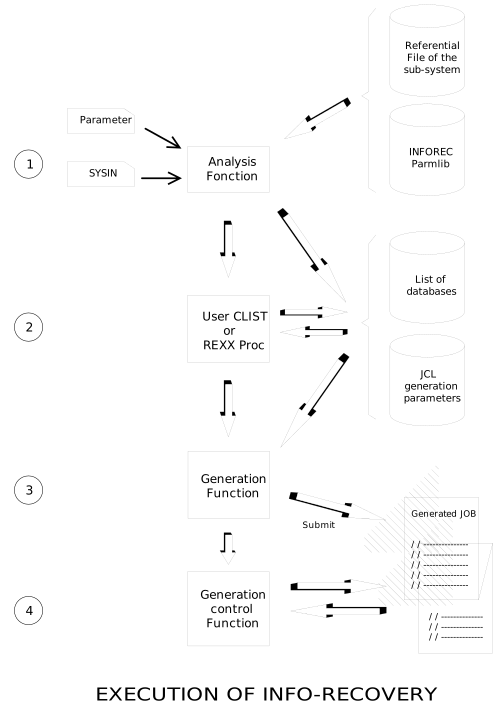
Whatever the executed INFO-RECOVERY software is, the operating mode is always identical.
-
Request analysis and JCL generation parameter preparation.
-
Identify the requested function and the subsystem (IMS and/or DB2) on which it has to run.
For example, perform image copy on all the tablespaces of the DB2 "DB2P".
-
Create the list of databases to process:
Identify databases named in SYSIN, accessing the reference file of the subsystem (RESLIB for IMS and/or the catalog for DB2),
-
Identify the function parameters.
They specify JCL generation parameters. For example, execute an image copy on disc or on tape.
-
-
Execution of CLIST or REXX procedures of the site
They allow the modification of the list of objects and generation parameters.
-
Skeletons inclusion and generation of JCL and/or sysin of utilities that will insure the execution of the requested function,
-
JCL submitting or dynamic call of the function, and controlled execution of the function or the JCL.
The operating mode of INFO-RECOVERY can be schematized as follows:
BATCH Execution
In batch mode as well as in interactive, the execution of INFO-RECOVERY is requested by the call of the module CSXEXEC.
In batch mode, the necessary JCL is the following:
//S1 EXEC PGM=CSXEXEC,DYNAMNBR=50,REGION=2M,
// PARM=(FUNCTION,\'Funcname\'\[,Name,\'Value\'\])
//SYSIN DD *
Parameters of the requested function
When executed in batch mode, the module CSXEXEC receives two types of parameters:
-
The execution parameter defines the function to execute,
-
The SYSIN file specifies on what databases to execute the function and detailed parameters of the function.
Parameters
CSXEXEC receives a succession of (Name,Value) pairs, where Name is the name of a variable and Value its value. The value has to be coded between apostrophes.
Expected variables follow:
{wrapper="1" role="DL"}
-
FUNCTION
This parameter is mandatory; it specifies the name of the function to execute: CS1VIC, CS1IC, etc....
-
IMSID
This parameter is optional; it specifies the IMS subsystem on which the function will execute. The subsystem has to be defined in parmlib member IMSIDS.
For a data sharing environment, the name of the IMS group can be specified. The group of IMSs must have been defined in member IMSDSGS of the PARMLIB.
If this parameter is omitted, INFO-RECOVERY will work on the default IMS subsystem (as defined in parmlib member SYSIDS). The special value IMSID,'NONE' allows for skipping all IMS-related allocations; it may only be used for mixed DL1/DB2 functions for those executions in which only DB2 selection parameters are entered.
-
DB2ID
This parameter is optional; it specifies the DB2 subsystem on which the function will execute. The subsystem has to be defined in parmlib member DB2IDS.
You may specify the name of the DB2 group if data sharing is used on your site. If such is the case, the DB2 group must have been defined in member DB2DSG of the PARMLIB. INFO-RECOVERY will select the DB2 sub-system (inside the group) according to the system where the execution takes place.
If this parameter is omitted, INFO-RECOVERY will work on the default DB2 subsystem (as defined in parmlib member SYSIDS). The special value DB2ID,'NONE' allows for skipping all DB2-related allocations; it may only be used for mixed DL1/DB2 functions for those executions in which only IMS selection parameters are entered.
-
DEBUG
This parameter is optional. If any problem occurs, the DEBUG function allows the user to trace the Clist (or REXX) procedures, the INFO-RECOVERY skeletons, and the commands passed to the subsystem (IMS/DB2). Values: 'Y' or 'N' (default).
The example below shows the execution of a FULL IMAGE COPY (CS1FIC function) on the DB2 DB2E:
 //S1      EXEC PGM=CSXEXEC,DYNAMNBR=50,REGION=2M,
 //             PARM=(FUNCTION,'CS1FIC',DB2ID,'DB2E')
 //SYSIN   DD *
  Parameters of the CSIFIC function
Execution of an IMS image copy processing on the default IMS, with tracing of Clist and IMS commands.
 //S1      EXEC PGM=CSXEXEC,DYNAMNBR=50,REGION=2M,
 //             PARM=(FUNCTION,'CS1IC',DEBUG,'Y')
 //SYSIN     DD *
  Parameters of the CS1IC function
SYSIN
The SYSIN file specifies variables that will manage the execution of the requested function.
-
Indication variables:
On what databases and/or what tablespaces the function must be executed?
-
Execution variables:
How the function has to be executed?
Format
The SYSIN sets variables with the following syntax:
VARIABLE=value
Note1: The character '*' in column 1 indicates a comment.
Note2: The blank character (' ') after the value indicates that the rest of the line is a comment.
Note3: The name of the variable must not begin in column 1. First column is reserved for the label followed by a blank.
Note4:A comma (',') behind the value of a variable connects the variable to the next variable and creates groups of variables. There will be as many executions of the function as there are groups of variables.
Note5: It is easier to read the SYSIN when starting the line with the indication variable: variable "DB" for IMS and variables "TS" and "DBSET" for DB2.
The different execution variables and the associated syntax are described in chapters covering each function.
Default Values
It is not necessary to systematically enter all execution variables of a function into the Sysin:
For each INFO-RECOVERY function, a member of the same name is associated in the parmlib library.
It has the same syntax as the SYSIN file.
It contains the definition of all variables necessary for the execution of the function.
It sets the default customization of the function for the site. (see: Customizing INFO-RECOVERY).
The example below shows the execution of a FULL IMAGE COPY (function CS1FIC) of tablespaces from the DB2 DB2E and which name starts with CLI:
 //S1      EXEC PGM=CSXEXEC,DYNAMNBR=50,REGION=2M,
 //             PARM=(FUNCTION,'CS1FIC',DB2ID,'DB2E')
 //SYSIN   DD *
  TS=(CLI*)
In this example, no execution parameter was specified. The values found in member CS1FIC of the Parmlib will be used.
User Variables
User variables can also be specified in SYSIN and can also be used in REXX procedures (or CLIST) or in user skeletons (see: User Variables).
The Other Data Sets
Below is the list of optional DD cards and their use:
CSXPRINT
Checking the printing of messages. By default they are dynamically sent to SYSOUT=*.
CSXPLIB
Using a PARMLIB other than the default parmlib. The example below illustrates a VIC JCL where the parmlib has been forced:
 //S1      EXEC PGM=CSXEXEC,DYNAMNBR=50,REGION=2M,
 //             PARM=(FUNCTION,'CS1VIC',IMSID,'IMST')
 //CSXPLIB DD   DSN=INFOREC.V1R0.CSBPLIB,DISP=SHR
 //SYSIN   DD   *
   DB=(DBCLI*),ID=CLI01             <===... vic client database
CSXULIB
To add a user parmlib (see: User Configuration under ISPF/TP). The use of CSXULIB redefines ISPF objects used by the software and the default customization of the function. A member of the parmlib is then "masked" by a member with the same name existing in the user library.
The example below illustrates a RECOV JCL where a user library has been added:
 //S1      EXEC PGM=CSXEXEC,DYNAMNBR=50,REGION=2M,
 //             PARM=(FUNCTION,'CS1RECOV',IMSID,'IMST')
 //CSXULIB   DD DSN=userid.INFOREC.USERLIB,DISP=SHR
 //SYSIN     DD *
   DB=(DBCLI*),ID=CLI01,TEST=Y      <===... test of recovery
JCLOUT
All functions that generate JCL accept a TEST= parameter, allowing to print (TEST=Y) or to submit (TEST=N) the generated JCL. It is possible to write the generated JCL into a data set instead of submitting it by adding a JCLOUT DD statement.
The example below illustrates a JCL of RECOV where the submit has been routed to the library specified in JCLOUT:
 //S1      EXEC PGM=CSXEXEC,DYNAMNBR=50,REGION=2M,
 //             PARM=(FUNCTION,'CS1RECOV',IMSID,'IMST')
 //JCLOUT    DD DSN=userid.INFOREC.JCLOUT(MYRECOV),DISP=SHR
 //SYSIN     DD *
   DB=(DBCLI*),ID=CLI01,TEST=N    <===... Recov JCL copied to JCLOUT
Execution under TSO/ISPF
As for the batch mode, the CSXEXEC module initializes the INFO-RECOVERY environment.
In CLIST, the starting command is the following:
ISPEXEC SELECT PGM(CSXEXEC) NEWAPPL(CSX)
Inside a menu, the starting is requested as follows:
&ZSEL = 'PGM(CSXEXEC) NEWAPPL(CSX)'
The execution of one of the two previous commands results in the display of the main INFO-RECOVERY menu:
INFO-RECOVERY - Primary Panel
COMMAND ===\>
1 INFOREC1 - Control DL1 recovery files
2 INFOREC2 - Control DB2 recovery files
V INFOVIC - IMS/DB2 data recovery
C CONFIG - User Profile Configuration
E EDIT - Edit current parmlib
P PARMLIB - Parmlib Management
T TERMINAL - Display logical terminal
J JOBS - Submitted jobs log
I INSTALL - Installation functions
N NOTES - Show INFO-RECOVERY changes
Available options:
-
InfoRec1, control of IMS recovery data sets, is described in the InfoRec1 User Manual: HR101,
-
InfoRec2, control of DB2 recovery data sets, is described in the InfoRec2 User Manual: HR102,
-
InfoVic1 and InfoVic2, execution of the DB2 and IMS recovery, are described in the HR103 User Manual,
-
Option C (configuration), allows the ISPF user to define its own environment: which IMS or DB2 to execute functions,...
This option is described in annex: User Configuration under ISPF/TP.
-
Option E (edit) allows access to EDIT the current PARMLIB and to modify default parameters.
-
Option P (parmlib) and option I (installation) are described in the Installation Manual HR104.
-
Option T (terminal) accesses the logical terminal that draws all function executions and associated sysouts. It is described in paragraph Logical Terminal.
-
Option J (jobs) accesses the list of jobs submitted under the control of an INFO-RECOVERY session.
-
Option N allows viewing of product modifications.
Customizing INFO-RECOVERY
All functions of INFO-RECOVERY are managed by ISPF variables. Associated with the ISPF skeletons, they generate the JCL for each function.
INFO-RECOVERY uses three types of variables:
-
System variables,
-
Site variables,
-
Function variables;
INFO-RECOVERY allows the use of a fourth type of variable: user variables.
Depending on their type, variables can be found in these locations:
-
Within call parameters of CSXEXEC in batch mode or user configuration in interactive mode
-
Within information provided during the call:
SYSIN File in batch mode or function screen in interactive mode;
-
In the parmlib library,
-
Or directly generated by INFO-RECOVERY.
If a variable is specified both in SYSIN and PARMLIB, the value specified in SYSIN will be used.
If a variable is specified neither in SYSIN nor in PARMLIB, INFO-RECOVERY will use its own defaults.
System Variables
System variables are non-updatable variables that are generated automatically during each execution. They cannot be specified in the user parmlib or in the SYSIN file.
Example: variable HHMMSSD that is used for the generation of an image copy dsname. This variable contains the execution timestamp specified in tenth of seconds.
The list of system variables and their meaning is described in paragraph: System Variables.
Site Variables
Site variables define to INFO-RECOVERY the site's execution configuration and general conditions.
Their values can be specified in call parameter, in the SYSIN file or in the parmlib of INFO-RECOVERY.
6 members of the parmlib provide variables for the site:
-
SYSIDS describes all MVS systems using the products
-
IMSIDS describes IMS systems using the products
-
DB2IDS describes DB2 systems using the products
-
PRODUCTS describes installed products
-
CUSTOM describes the global INFO-RECOVERY customization
-
CTRLRUN checks the status of batch CSXEXEC
The format of these members is described in the Appendix. Modification rules are detailed in the Installation Manual HR104.
Function Variables
Function variables are used to specify execution parameters of a function.
Their values can be specified in the SYSIN file or in the parmlib of INFO-RECOVERY in a member having the same name as the function.
Several variables are associated with each function. They are described in chapters that explain the function.
The user is informed about the:
-
indication variables
-
execution variables
After the first installation, parmlib members associated with functions contain a customization adapted to the most frequent use of INFO-RECOVERY and they only need to be modified for sophisticated tests (see adjustment paragraphs and complements for each function).
During re-installations or further upgrades, the customization is preserved and the new parameters are automatically added. This modification is dated. The list of all members that have been automatically modified may be viewed with the option 'Note' on the main INFO-RECOVERY menu.
User Variables
User variables can be entered into the SYSIN file or in the parmlib member corresponding to the function.
These variables may be used by ISPF skeletons and REXX procedures (CLIST).
The example below illustrates the execution of a RECOVERY (function CS1RECOV) of IMS IMST databases which name begins with DBX, and specifies the user parameter USERDEST (this parameter is supposed to allow the routing of sysouts to a particular printer).
 //S1      EXEC PGM=CSXEXEC,DYNAMNBR=50,REGION=2M,
 //             PARM=(FUNCTION,'CS1RECOV',IMSID,'IMST')
 //SYSIN     DD *
   DB=(DBX*),USERDEST=rmt27
Calling User Procedures
As indicated previously in paragraph Execution, INFO-RECOVERY allows the execution of user REXX or CLIST procedure.
Corresponding members can be found in the PARMLIB or in a library declared in the member SYSIDS of the parmlib (variable SYSPROC or SYSEXEC).
The calling mode of these procedures is specified in Calling User Procedures.
Generated Job Control
JOB Card
It is possible to determine the JOBNAME and other characteristics of the JOB generated by modifying generation variables of the JOB card.
It is built using the standard clist JOBCARD, the member CUSTOM of the parmlib, and the ISPF skeleton CSKJOBC (parmlib). It is also possible to redefine its own JOB card by copying this last member in a declared user library. The copy will then 'mask' the original item (see the Installation Manual of INFO-RECOVERY HR104).
The example below illustrates all control options:
 //S1      EXEC PGM=CSXEXEC,DYNAMNBR=50,REGION=2M,
 //             PARM=(FUNCTION,'CS1FIC',DB2ID,'DB2E')
 //SYSIN     DD *
   TS=CATALOG,TEST=N,           <===... Full Image Copy
     JOBNAME=MYJOB,                 ... jobname
     CLASS=A,                       ... job CLASS
     MSGCLASS=X,                    ... MSGCLASS
     TYPRUN=SCAN,                   ... TYPRUN
     USER=userid,                   ... USER
     PSW=password,                  ... user PSW
     NTUSER=userid,                 ... NOTIFY
     ACCOUNT=account                ... ACCOUNT
Checking the Execution
Jobs submitted by INFO-RECOVERY functions may be checked using option JOBCHECK=Y/N. The default value of this option is specified in the CUSTOM member of the parmlib. This option may be specified at any time by adding the jobcheck= parameter prior to the execution of a function.
When job control is requested, the request ensures that all generated jobs will be finished before it ends. Therefore, the work may be checked as a single task. If one of the generated jobs abends, the request also abends to report the problem. (see "RC" to issue a return code instead of an abend 4001).
When executing an INFO-RECOVERY function in batch mode, the maximum waiting time for the start is specified using option JOBQTIME=(HHMM). The default value of this option and the period of the waiting cycle JOBWAIT=(seconds) are specified in the CUSTOM member. If the delay has expired, the job is PURGED. If the job starts, it will run until it ends (normal or abend).
When leaving the ISPF panels of INFO-RECOVERY, the product will purge all QUEUED jobs (keep the RUNNING jobs). If you return to INFO-RECOVERY before the end of these jobs, INFO-RECOVERY will recognize the jobs. If not, their status will be UNKNOWN.
A generated job with the option JOBCHECK=Y will abend if the generating job is missing or has been purged.
The status of the submitted job may be any of these:
-
QUEUED- The job is waiting for its execution.
-
RUNNING- The job is active.
-
ENDED- The job is over.
-
ABENDED- The job abended.
-
UNKNOWN- The job status is unknown. Case of the active jobs left by the generating job.
-
PURGED- The waiting job has been deleted as a result of the deletion of the request. In this case, the selected job will detect that the waiting job is missing and will issue its own purge.
Under ISPF, it is possible to directly access SDSF for a specific job using selection code S.
Execution Results
When executing CSXEXEC in batch mode, the following abends can be issued:
-
ABEND 4001 in case of an incorrect execution of the CSXEXEC function, or an ABEND 4002 in case of
-
ABEND 4002 in case of a system abend (non-ISPF)
-
ABEND 4003 in case of an ISPF error.
Carefully examine the execution report to find the messages explaining the reason for the error.
The user may also request to issue a return code instead of an abend 4001 bu specifying the parameter RC= in the member CUSTOM of the parmlib (for all batch executions) or in SYSIN (for a specific execution). The default value of the RC= parameter is 0 (no conversion).
InfoRec1 - Physical Recovery of DL/1
Select option 1 from the general menu of INFO-RECOVERY to display the menu of InfoRec1:
INFOREC1 - Primary Panel
COMMAND ===\>
1 INIT - Update RECON for DB(s)
2 IC - Physical Image Copy for DB(s)
3 CA - Change Accumulation for DB(s)
4 REORG - RECON datasets online reorganization
5 DELETE - Delete obsolete recovery objects for DB(s)
6 MDISK - List/Migrate/Delete of DSN(s)
InfoRec1 includes the following functions:
-
CS1INIT, Declarations to DBRC
-
CS1IC, Image Copies
-
CS1CA, Change Accumulations
-
CS1RRORG, Online Reorganization of the RECON datasets
-
CS1DLET1, Purge
-
MDISK, Disk Management (see function CS1MDISK).
These functions are described in the following chapters.
CS1INIT - Declarations to DBRC
Purpose
The CS1INIT function automatically prepares DBRC RECON dataset updates for one or more databases.
Data bases are found in:
-
the DBDLIB of IMS
-
the DYNLIB (dynamic allocation)
-
the RECON dataset
A database is OK if the three descriptions are coherent.
The CS1INIT function allows the user to define or modify a DBDS group or a CA group. In the latter case a unique CA group is to be associated to the set of databases mentioned to CS1INIT. A preliminary requirement is to distribute databases that must be controlled by DBRC into disjoined subsets, with each subset belonging to a unique CA group.
Note1: We recommend to make a CA group for each application.
A share level (shrlevel) DBRC/IRLM is attached to the set of the indicated databases. Possible values indicate shared uses:
-
0: no share
-
1: databases can be read without integrity when there are competing updates.
-
2: share in update; this mode is only possible with the installation of IRLM.
-
3: share in update between several systems; same remark.
Note2: We recommend that DBRC beginners choose shrlevel=1 and execute batch jobs in BMPS.
The CS1INIT function can be considered as a DBRC initialization tool and as a regular control tool. Indeed, the JCL to update the DBRC is only prepared when changes are necessary.
This function, when executed regularly, frees the operator from the DBRC declaration constraints while ensuring that the IMS environment external to DBRC is consistent with the RECON dataset.
Note3: The INIT function declares to DBRC an intention to register the maximum number allowed of ICs and CAs: 254 ICs and 255 CAs. Thus DBRC will register all executed ICs and CAs whatever might happen. According to the recovery objectives, the purge function (CS1DLET1) will finally decide about the items to be deleted from the RECON dataset.
Note4: DEDBs declared to DBRC do not allow a direct relationship between chosen DDNs and the DBD; therefore a rule to associate the corresponding ddnames in the dynamic allocation library with the name of an AREA, the corresponding ddnames must be provided. The parameter ADDN= (described later within this manual) ensures this task.
Note5: When the request is issued on a database already assigned to a CA group, CS1INIT reallocates this database to the new CA group that was specified.
The function searches in the DBDLIB and the DYNLIB of the current IMS for all databases according to the specified criterion. The names of DBDLIB and DYNLIB libraries are found in member IMSIDS of the current parmlib (see: installation guide of INFO-RECOVERY, document HR104). A search of the RECON DBRC dataset is performed to determine if creating or updating is required. No JCL will be generated if CS1INIT encounters any inconsistency between the DBDLIB, the DYNLIB, or the RECON dataset.
In interactive mode: press ENTER to confirm your command, the processing omatically.
In any inconsistency is encountered the following message is displayed:
CS1INIT-002E: ERROR REACHED ON THIS DB. NO RUN WILL BE ISSUED
to inform the user about an inconsistency at the database level.
The following message:
CS1INIT-003E: ERROR REACHED ON THIS DS. NO RUN WILL BE ISSUED
inform the user about an inconsistency at the level of a dataset of a database.
Examine the reason of the error by analyzing the messages that were issued previously to the above message.
If the processing was successful, either a DBRC JCL will be generated which states the necessary changes, or by getting this message:
NOTHING TO DO FOR THIS PARAMETER SET
That means that the indicated databases are correct for the IMS environment.
The CS1INIT function is incompatible with partitionned data bases (HALDB) of IMS Version 7.
Syntax
The execution variables of the function CS1INIT are listed below.
The user can request the modification of the default values of the function by modifying the member CS1INIT of the parmlib.
* comment
DB=(criterion,..), DB search criterion
ADDDB=(criterion,.), DB to be added search criterion
DELDB=(criterion,.), DB to be deleted search criterion
CA=cagrp, name of the CA group attached to DBs
DBDSGRP=dbdsgrp, name of the DBDS group attached to DBs
ADDN=addn, criterion of association ADDN for DEDB
SHRLEVEL=level, shrlevel DBRC of DBs
TEST=Y/N, print (Y, def) or submit (N) of the generated
* JCL
SKELETON=skeleton, name of the attached skeleton
CLIST=clist, name of the clist to use
FORCE=Y/N, possibility to force the JCL even
* when the DBs are OK
Uservariable=, any user variable like=\"\...\" a title
* comment
DB=(criterion,), next set of parameters
\...
{wrapper="1" role="DL"}
-
DB= (criterion,...)
DB= specifies the database set to attach to the CA group. The criterion can be either specific or generic.
-
ADDDB=(criterion,.)
ADDDB= specifies the list of criteria identifying databases that are to be added to a CA group or to a DBDS group.
-
DELDB=(criterion,.)
DELDB= specifies the list of criteria identifying databases that are to be deleted from a CA group or from a DBDS group.
-
CA=cagrp
CA= is the name of the CA group to be attached to DBs.
Default parameter: * * indicates that consistency of definitions (see Purpose) must be checked.
-
DBDSGRP=dbdsgrp
DBDSGRP= is the name of the DBDS group to attach to DBs.
-
SHRLEVEL=level
SHRLEVEL= is the DBRC share level that is required. (see Purpose or refer to the DBRC documentation).
Default parameter: * * indicates that the current shrlevel must be retained.
-
ADDN=addn
ADDN= specifies a rule of construction of DDNs attached to an AREA using the name of the AREA. We recommend to have a valid general convention for all AREAS.
If this convention specifies that DDNs attached to an AREA use the last 7 characters of the name of the AREA, ADDN=234567* has to be coded.
If the criterion is that AREA=abcdefgh --> DDN=bcdgh*, ADDN=23478* has to be coded;
Default parameter: 12345678
-
SKELETON=skeleton
SKELETON= specifies the name of the skeleton attached to function CS1INIT.
Default parameter: CSSINIT CSSINIT is the name of the skeleton usually attached to CS1INIT. The skeleton CSSINIDL can be used to suppress DBs of the RECON.
-
CLIST=clist
CLIST= requires the execution of a user clist prior to JCL generation.
Default parameter: NONE NONE indicates that no clist has to be called.
-
FORCE=Y/N
FORCE=Y requires the initialization even when DBs are declared correctly. This parameter is used to initialize existent DBs in the RECON.
Default parameter: N (no force)
Examples
Declaration to DBRC of the constituted CLI application for all databases beginning with DBCLI. Attached to this application is the CA group CACLI. All databases are in share level 1:
 DB=DBCLI*,CA=CACLI,SHRLEVEL=1         ... visual. of the JCL (TEST=Y)
 DB=DBCLI*,CA=CACLI,SHRLEVEL=1,TEST=N  ... submit of the JCL (TEST=N)
Verification that databases of the CLI application are correctly defined in DBRC:
DB=DBCLI*
Automatically take into account any new database beginning with DBCLI. The share level and the CA group are fixed in advance. The JCL will be generated only if there is something to do.
DB=DBCLI*,CA=CACLI,SHRLEVEL=1,TEST=N
Forcing JCL when databases are OK:
DB=DBCLI*,FORCE=Y
Changing SHRLEVEL 1 in SHRLEVEL 2 for the CLI application:
DB=DBCLI*,SHRLEVEL=2
Declaration of a DBDS group:
DB=DBPRO*,DELDB=(DBPROA,DBPROA),DBDSGRP=DBPRO,SHRLEVEL=1
Addition to an existing CA group of databases beginning with DBCLIX :
ADDDB=DBCLIX*,CA=CACLI,SHRLEVEL=1,TEST=N
Deletion of the RECON dataset for everything concerning databases of the CLI application (batch example):
 //S1      EXEC PGM=CSXEXEC,DYNAMNBR=50,REGION=2M,
 //             PARM=(FUNCTION,'CS1INIT',IMSID,'IMSE')
 //SYSIN     DD *
  DB=DBCLI*,FORCE=Y,SKELETON=CSSINIDL
CS1IC - Image Copy
Purpose
The CS1IC function automatically prepares image copies for one or more databases. It is an asynchronous function, semi-independent of applications planning, except in the case of the online image copy and the image copy 2 in SMSCIC, it requires a mutually exclusive execution with applications using the same databases (see: Job Scheduling), except in the case of the online image copy.
Databases to be saved are found in the RECON dataset. A JCL is then built from an ISPF skeleton: CSSIC.
The operator has to define a frequency of backups for each application (ex: once a week), and to plan, with the use of the job management system, the triggering of this function.
The use of generic criteria and the controls provided by the job management system ensure that databases for which recovery is ensured by DBRC are regularly and correctly saved.
The function consists of selecting in the DBRC RECON dataset IMS databases which names correspond to the generic criterion provided by the DB parameter, and building the corresponding image copy JCL in order to view it or execute it (according to the TEST parameter).
If the image copy file is on DISK, the CS1IC function derives the file allocation parameters from the actual size of the database.
Syntax
The execution variables of the function CS1IC are listed below.
The user can request modification of the default values of the function by modifying the member CS1IC of the parmlib.
* comment
DB=(criterion,.), DB search criterion or \...
DBDSGRP=dbdsgrp, \... DBDS group criterion
TEST=Y/N, print (Y, default) or submit (N) of the JCL
* generated
SKELETON=skeleton, name of the skeleton associated
CLIST=clist, name of the clist to use
HALDB=Y/N, include or not the HALDB databases for
* processing
DUAL=Y/N, dual IC or not
TAPE=Y/N, primary IC on tape or not
DISK=Y/N, dual IC on disk or not
OIC=Y/N/X/S, online IC or IC2
Y for Online IC
X for IC2 format SMSNOCIC
S for IC2 format SMSCIC
SMSNOCIC=L/P, freeing the logical/physical phase if OIC=X
PSBNAME=psbname, name of the PSB to use if OIC=Y
DVOL=dvol, specific volume for IC disk
TUNIT=tunit, unit for ICs tape
DUNIT=dunit, unit for ICs disk
DTYPE=dtype, type of DASD for the disk ICs
USP=usp, default allocation unit for IC disk
PSP=psp, default primary allocation for IC disk
SSP=ssp, default secondary allocation for IC disk
TYPE=type, type of the IC: IMS/FAVER.
AUTO=Y/N, IC option automatic or not
NOTP=notp, notp option for AOP: C/R/W
MODE=mode, automatic mode IC : INQUIRY/DEALLOC
SWITCH=switch, wait time automatic switch (mn)
* AOPoption=, any AOP parameter
EVENT=, event of a system of job management
DFSVSM=dfsvsm, member DFSVSAMP of the proclib IMS to
* use
Uservariable=, any user variable like=\"\...\" a title
* comment
DB=(criterion,..), next set of parameters
\...
{wrapper="1" role="DL"}
-
DB= (criterion,.)
DB= specifies the set of databases for which to make an image copy in the case when DBDSGRP is not mentioned. Each criterion can be either specific or generic.
The HALDB databases (dbmaster and/or partition) are also included for processing except if the parameter HALDB(N) is specified.
-
DBDSGRP=dbdsgrp
DBDSGRP= specifies the set of databases for which to make an image copy as the set of databases associated to the DBDS group mentioned; if DBDSGRP parameter is specified, the DB parameter is ignored.
-
SKELETON=skeleton
SKELETON= is the name of the standard skeleton attached to the function. A user skeleton may be used.
Default parameter: CSSIC
-
CLIST=clist
CLIST= requests the execution of a user clist before the JCL is generated.
Default parameter: NONE NONE indicates that no clist has to be called.
-
HALDB=Y/N
Specifies if the processing must include (Y) or not include (N) HALDB databases of IMS Version 7 (when performing a generic research on the name of the dbmaster or the name of the partition)
Default parameter: Y
-
DUAL=Y/N
DUAL=Y requests a dual IC. In the case of a FAVER image copy, the image copy is followed by a repro to create a dual image copy;
Default parameter: N
-
TAPE=Y/N
TAPE= requests the primary IC to be on tape (Y) or on disk (N). If the image copy is made on tape and if the request concerns several databases, the generated JCL will specify a multi- file (or multi-volume) tape output for image copy files.
Default parameter: Y
-
DISK=Y/N
DISK= requests the dual IC to be on disk (Y) or on tape (N). Refer to the remark above.
Default parameter: N
-
OIC=Y/N/X/S
OIC= requests the image copy to be an ONLINE image copy of type IMS (see complements), the values X and S are available from IMS version 6 up to use IC2 concurrent Copy DFSMS/DSS, X - using format SMSNOCIC S - using format SMSCIC
note
:
Mandatory: a recovery using IC2 must be performed under DBRC (see the CSSRECFR skeleton).
Default parameter: N
-
PSBNAME=psbname
PSBNAME indicates the name of the PSB of the online image copy. It is required if OIC=Y (see complements).
Default parameter: TEMPNAME
-
SMSNOIC=L/P
if OIC=X is specified, this parameter indicates if the database must be restarted after the phase of the logical (L) or physical (P) copy.
Default parameter: L
-
DVOL=dvol
DVOL= indicates, if necessary, the specific name of a disk volume that will contain the ICs.
Default parameter: blank
-
TUNIT=tunit
TUNIT= is the allocation unit of tape ICs (TAPE,...).
Default parameter: &TAPEGRP &TAPEGRP indicates that the default tape unit (specified in the parmlib member CUSTOM) is used.
-
DUNIT=dunit
DUNIT= is the allocation unit of disk ICs (SYSDA,...).
Default parameter: &DISKGRP &DISKGRP indicates that the default disk unit (specified in the parmlib member CUSTOM) is used.
-
DTYPE=dtype
DTYPE= is the type of DASD used for the disk ICs (3380 or 3390). This value is used to optimize the space allocations.
Default parameter: 3380
-
USP=usp
USP= is the default allocation unit of the disk ICs (TRK, CYL, BLKsize). The values USP, PSP and SSP are used only if the size information relative to the database being processed is unavailable. Otherwise, the unit and the accurate primary and secondary allocations are calculated by INFO-RECOVERY for each database to process.
Default parameter: TRK
-
PSP=psp
PSP= is the default primary allocation (see USP) in the USP unit defined above.
Default parameter: 90
-
SSP=ssp
SSP is the default secondary allocation (see USP) in the USP unit defined above.
Default parameter: 360
-
TYPE=type
TYPE= specifies whether an IMS type IC (TYPE=IMS) or a FAVER type UIC (TYPE=FAVER) is required (see complements).
Default parameter: IMS
-
AUTO=Y/N
AUTO=Y requests the automatic TP deallocation and reallocation of the databases (via AOP) before and after the image copy.
Default parameter: N (see complements);
-
NOTP=notp
NOTP= controls the execution of the automatic operator when the IMS TP is not active (see: CS1AOP as described in the user manual HR103).
Default parameter: &NOTP &NOTP means that the value indicated in the parameters of CSXEXEC must be used.
-
MODE=mode
MODE= specifies the deallocation mode when AUTO=Y. It is forced to DEALLOC if OIC=N. Refer to the description of CS1AOP in the user manual HR103.
Default parameter: blank
-
SWITCH=switch
SWITCH= is the maximum wait time for a spontaneous switch of OLDS when AUTO=Y; see CS1AOP.
Default parameter: 15
-
AOPoption=
CS1AOP parameters may be specified here; they will be taken into account by the automatic operator (AOP) during the execution of the IC if AUTO=Y.
Example WAIT=20
Default parameter: blank
-
EVENT=
EVENT= automatically adds, at the end of the job, notification to the site job management system of an event which name is specified. It allows the operator to plan for this event.
Default parameter: blank
-
DFSVSM=dfsvsm
DFSVSM= requests the use of a specific member DFSVSAMP to control the buffering during the ICs.
Default parameter: DFSVSM00
Examples
Image copy of all databases beginning with DBCLI. Defaults are used, i.e., no dual IC, implantation on tape, IC of IMS type: off-line:
 DB=DBCLI*          <===... visualization of the JCL (TEST=Y)
 DB=DBCLI*,TEST=N   <===... submit of the JCL (TEST=N)
Image copy of databases DBCLI * on disk:
DB=DBCLI*,TAPE=N
Image copy of databases DBCLI01 and DBCLI02 on disk with dual ICs on tape:
DB=(DBCLI01,DBCLI02),TAPE=N,DUAL=Y,DISK=N
Image copy of databases DBCLI * and the database DBPRO on disk with optimal allocation:
DB=(DBCLI*,DBPRO),TAPE=N,DUNIT=ICPOOL,DTYPE=3390
Image copy of databases DBCLI * with automatic TP deallocation and reallocation. A switch will be forced 20 minutes later if updates of databases have not been archived and if any spontaneous switch of OLDS does not appear during this lapse of time:
DB=DBCLI*,AUTO=Y,MODE=DEALLOC,SWITCH=20
User Image Copy of databases DBCLI * with the product FAVER:
DB=DBCLI*,TYPE=FAVER
Online image copy of databases DBCLI *. A PSB of online IC is provided (batch example):
 //S1      EXEC PGM=CSXEXEC,DYNAMNBR=50,REGION=2M,
 //             PARM=(FUNCTION,'CS1IC',IMSID,'IMSE')
 //SYSIN     DD *
  DB=DBCLI*,OIC=Y,PSB=PCLIOIC
Complements
Allocation values (unit, primary allocation, secondary allocation) for disk image copy files are computed by INFO-RECOVERY according to information read in the ICF catalog. The values of parameters USP, PSP and SSP are only used when the information obtained is insufficient.
With the option DUAL=Y, a dual IC is taken for each primary IC. Dual ICs can be implemented independently of primary ICs by using DISK= parameter.
Parameters TYPE= and OIC= select the type of desired IC. Valid combinations are:
-
TYPE=IMS (OIC=N), corresponds to an off-line IC of IMS type.
-
TYPE=IMS, OIC=Y, PSB=..., corresponds to an on-line IC of IMS type. The PSB of an on-line IC is required in this case.
-
TYPE=IMS, OIC=X, corresponds to an IC2 (Concurrent Copy DFSMS/DSS) of type IMS of format SMSNOCIC.
-
TYPE=IMS, OIC=S, corresponds to an IC2 (Concurrent Copy DFSMS/DSS) of type IMS of format SMSCIC.
-
TYPE=FAVER, corresponds to an off-line UIC of FAVER type.
The option AUTO=Y allows the automatic TP deallocation and reallocation of databases before and after IC processing.
In this case, and only if updates of databases have not been yet archived, the function waits for a spontaneous switch of OLDS during the lapse of time fixed by the parameter SWITCH=, (mn). This one elapsed, the switch is forced.
The switch, in the case of off-line ICs, is necessary for requesting an image copy to be aligned on a log frontier, according to DBRC requirements.
Although the INFOVIC product theoretically can do without it, it is necessary, in practice, to implement this switch. It guarantees the possibility to perform a recovery with the timestamp of the IC by using DBRC utilities. That way, a double cover is assured.
CS1CA - Change Accumulation
Purpose
The CS1CA function automatically prepares a Change Accumulation for one or more databases. This function is an asynchronous function, independent of applications planning.
Names of databases where changes must be accumulated are found in the RECON dataset. If changes must be accumulated, a JCL is built from an ISPF skeleton: CSSCA.
If all changes have already been accumulated, no JCL will be generated.
The operator should examine the distribution of the IMS global rate for one day, then divide the day in unequal slices of time so that the global volume of IMS logs by slice is the most constant possible.
The setting off of the CA function by application for each change of slice can then be planned, with the help of the job management system. No consideration linked to applications planning should be taken into account.
The use of generic criteria and the controls by the job management system ensure the operator that changes on databases where recovery is insured by DBRC are regularly and correctly accumulated. CAs are less voluminous than logs, so they can be retained a longer time on disk and they accelerate a possible recovery.
Note1: The CS1CA function automatically spreads all of the indicated databases to the implied CA groups. A change accumulation is always made for a whole CA group and therefore for all databases attached to this CA group.
Note2: The option DEBUG (see: User Configuration under ISPF/TP) can, if necessary, trace calls of the function to DBRC.
Note3: Triggering the CS1CA should be conditioned on a non-event of recovery. For a complete discussion on this problem, refer to the complements section of the chapter describing the CS1RECOV function.
The function selects in the DBRC RECON dataset IMS databases which names correspond to the provided generic criterion. The processing is successful if either JCL is generated stating the necessary change accumulations, or by displaying the following message:
CS1CA-002I: NOTHING TO DO FOR THIS REQUEST
meaning that all database changes have already been accumulated.
Syntax
The execution variables of function CS1CA are listed below.
The user can request modification of the default values of the function by modifying the member CS1CA of the parmlib.
* comment
DB=(criterion,.), DB search criterion or \...
DBDSGRP=dbdsgrp, \... DBDS group criterion
CA=cagrp, name of the CA group associated to DBs
TEST=Y/N, print (Y, default) or submit (N) of the
* generated JCL
SKELETON=skeleton, name of the associated JCL
CLIST=clist, name of the clist to use
HALDB=Y/N, include or not the HALDB databases for
* processing
DUAL=Y/N, dual CA or not
TAPE=Y/N, primary CA on tape or not
DISK=Y/N, dual CA on disk or not
USP=usp, allocation unit for a CA disk
PSP=psp, primary allocation for a CA disk
SSP=ssp, secondary allocation for a CA disk
CAMSEQL=camseql, max sequence length for this CA
CAMLREC=camlrec, max record length for this CA
DVOL=dvol, specific volume for a CA disk
TUNIT=tunit, unit for the CAs tape
DUNIT=dunit, unit for the CAs disk
Uservariable=, any user variable like =\"\...\" a title
* comment
DB=(criterion,..), next set of parameters
\...
{wrapper="1" role="DL"}
-
DB= (criterion,.)
DB= specifies the set of databases where CA is required if DBDSGRP is not mentioned. Each criterion can be either specific or generic.
The HALDB databases (dbmaster and/or partition) are also included for the processing except if the parameter HALDB(N) is specified.
-
DBDSGRP=dbdsgrp
DBDSGRP= specifies the set of databases where CA is required, also specifies the set of databases associated to the mentioned DBDS group; if the DBDSGRP parameter is specified, the DB parameter is ignored.
-
CA=cagrp
CA= specifies the set of databases associated to the CA group mentioned.
-
SKELETON=skeleton
SKELETON= is the name of the standard skeleton attached to the function. A user skeleton may be used.
Default parameter: CSSCA
-
CLIST=clist
CLIST= requests the execution of a user clist prior to generation of JCL.
Default parameter: NONE NONE indicates that no clist has to be called.
-
HALDB=Y/N
Specifies if the processing must include (Y) or not include (N) HALDB databases of IMS Version 7 (when performing a generic research on the name of the dbmaster or the name of the partition)
Default parameter: Y
-
DUAL=Y/N
DUAL=Y requests a dual CA.
Default parameter: N
-
TAPE=Y/N
TAPE= requests the primary CA to be on tape (Y) or on disk (N). If the CA is made on tape and if the request concerns several CAs, the generated JCL will specify a multi-files tape or even a multi-volume tape output for CA files.
Default parameter: N
-
DISK=Y/N
DISK=Y requests the dual CA to be on disk (Y) or on tape (N). Refer to the remark above.
Default parameter: N
-
USP=usp
USP= is the unit of allocation for disk CAs (TRK, CYL, size of BLK).
Default parameter: TRK
-
PSP=psp
TRK= is the primary allocation in the unit defined above.
Default parameter: 90
-
SSP=ssp
SSP= is the secondary allocation in the unit defined above.
Default parameter: 360
-
CAMSEQL=camseql
CAMSEQL= is the maximum CA sequence length.
Default parameter: 236
-
CAMLREC=camlrec
CAMLREC is the maximum CA record length.
Default parameter: 4351
-
DVOL=dvol
DVOL= indicates, if necessary, the specific name of a volume that will contain the CAs.
Default parameter: blank
-
TUNIT=tunit
TUNIT= is the allocation unit of the CA tape (TAPE,. ..).
Default parameter: &TAPEGRP &TAPEGRP indicates that the default tape unit (specified in the parmlib member CUSTOM) is used.
-
DUNIT=dunit
allocation unit of the disk CAs (SYSDA,...).
Default parameter: &DISKGRP &DISKGRP indicates that the default disk unit (specified in the parmlib member CUSTOM) is used.
Examples
Change Accumulation of all databases beginning with DBCLI. Defaults are used, i.e., no dual CA, implantation on disk:
 DB=DBCLI*                  <===... visual. of the JCL (TEST=Y)
 DB=DBCLI*,TEST=N           <===... submit JCL (TEST=N)
Change Accumulation of databases DBCLI * on tape:
DB=DBCLI*,TAPE=Y
Change Accumulation of databases DBCLI * on disk with dual CAs on tape:
DB=DBCLI*,TAPE=N,DUAL=Y,DISK=N
Change Accumulation of databases DBCLI * and databases DBPRO * on disk and adjusting the allocation:
DB=(DBCLI*,DBPRO*),USP=CYL,PSP=150,SSP=150,DUNIT=CAPOOL
CS1RRORG - Reorganizing the Recon Data Sets
Purpose
The CS1RRORG function automatically performs the reorganization of the RECON data sets. This function is an asynchronous function, independent of applications planning.
The reorganization of the RECON datasets is obtained by a sequence of CHANGE.RECON REPLACE operations and delete/define of the deallocated RECON, allowing all the RECONs to be recreated and reloaded by an internal repro of DBRC.
The CS1RRORG function automatically determines the status of the RECONs (COPY1, COPY2, SPARE, DISABLED and UNALLOC) and restores the situation whatever was the status before: RECON1/COPY1, RECON2/COPY2 and RECON3/SPARE.
Thus ensures that the RECONs datasets are regularly reorganized and the integrity (COPY1, COPY2 and SPARE) of the RECONs is always correctly re-established. In case of a problem with the RECONs, this function immediately reestablishes the normal situation. It plans, with the help of the job management system, a triggering of the function RRORG at least once a week. This function is intended to be planned during the TP session, but it can run independently.
Note1: The function automatically detects any current allocation of the RECONs (batch, archiving, etc...) and waits for the release of the allocated RECONs before executing the delete/define.
Syntax
The variables for executing the CS1RRORG function are described below.
The user can request to modify the default values of the function by modifying the member CS1RRORG of the parmlib.
* comment
TEST=Y/N, simulate (Y, default) or execute the reorg
* of the recons (N)
WAIT=wait, wait time (seconds) when the
* recons are not available
RETRY=retry number of tries when recons are not
* available
DYNAMIC=Y/N, create dynamically the
* delete/define or not
STEP=Y/N, stop after each step or not
FREESPC=freespc, minimum freespace to check
AMSLIB=amslib, amslib to use
RECON1=recon1, member containing AMS delete/define for
* the Recon1
RECON2=recon2, same for Recon2
RECON3=recon3 same for Recon3
{wrapper="1" role="DL"}
-
WAIT=wait
WAIT= is the maximum wait time when the RECONs are not available (see Note1 mentioned above).
Default parameter: 15
-
RETRY=retry
RETRY is the maximum number of successive tries after WAIT time is expired.
Default parameter: 60
-
DYNAMIC=Y/N
DYNAMIC=Y addresses the dynamic creation of the delete/define of the recons according to their current definition (Y) or according to members specified further down (N).
Default parameter: Y
-
STEP=Y/N
STEP= means to stop after each step.
Default parameter: N
-
FREESPC=freespc
FREESPC= indicates (by an abend 4001) any situation where the RECON datasets do not have a minimum of provided free space.
It checks the size of the RECONs. A modification of the reference AMS and a run with DYNAMIC=N re-establishes the correct situation.
Default parameter: 20
-
AMSLIB=amslib
AMSLIB= is the library of AMS sources in which are located the members containing the delete/define of the RECONs.
Default parameter: &AMSLIB &AMSLIB indicates that the default library specified in the member IMSIDS of the parmlib will be used; used when DYNAMIC=N;
-
RECON1=recon1
RECON1= indicates the name of the member of the amslib mentioned above, containing the delete/define of the RECON1 (same for recon2 and recon3).
Examples
Reorganization with verification that at least 20% of freespace is available on the RECONs with 30 seconds of wait for 50 retries in case of an allocation in progress of a deallocated recon:
TEST=N,FREESPC=20,WAIT=30,RETRY=50
Reorganization step by step:
TEST=N,STEP=Y
Reorganization forcing the use of AMS sources of the AMSLIB:
TEST=N,DYNAMIC=N
CS1DLET1 - Purge
Purpose
The CS1DLET1 function automatically prepares the purge, for one or more databases, of recovery objects that became useless.
This function is an asynchronous function, independent of applications scheduling.
Databases for which the purge is requested are found in the RECON dataset. A JCL is then built from an ISPF skeleton: CSSDLET1.
The operator should schedule for each application, with the help of the job management system, the triggering of this function regularly (ex: once a week).
The use of generic criteria and the control of the job management system ensure the operator that objects of recovery (logs, ICs, CAs) are managed synchronously with DBRC, i.e., that any object registered to DBRC really exists, and vice versa.
The recovery objectives are thus accurately respected with a minimum number of retained objects.
Syntax
The variables for executing the CS1DLET1 function are listed below.
The user can request modification of the default values of the function by modifying the member CS1DLET1 of the parmlib.
* comment
DB=(criterion,.), DB search criterion or \...
DBDSGRP=dbdsgrp, \... DBDS group criterion
TEST=Y/N, print (Y, default) or submit (N) of the
* generated JCL
SKELETON=skeleton, name of the associated skeleton
CLIST=clist, name of the clist to use
HALDB=Y/N, include or not the HALDB databases for
* processing
ICMAX=icmax, number of the ICs to retain
RDAYS=rdays, recovery period to ensure (days)
PURGE=purge, purge limit of the PRILOGs (days)
TOTIME=Y/N, processing the PRILOG that contains the most oldest IC
EVENT=, event of a job management system
Uservariable=, any user variable like=\"\...\" a title
* comment
DB=(criterion,..), next set of parameters
\...
{wrapper="1" role="DL"}
-
DB= (criterion,.)
DB= specifies the set of databases for where a purge of recovery objects must be made if DBDSGRP is not mentioned. Each criterion can be either specific or generic.
The HALDB databases (dbmaster and/or partition) are also included for processing except if the parameter HALDB(N) is specified.
-
DBDSGRP=dbdsgrp
DBDSGRP= specifies the set of databases where a purge of recovery objects must be made as the set of databases associated to the DBDS group mentioned; if DBDSGRP parameter is specified, the DB parameter is ignored.
-
SKELETON=skeleton
SKELETON= is the name of the standard skeleton attached to the function; a user skeleton may be specified.
Default parameter: CSSDLET1
-
CLIST=clist
CLIST= requests the execution of a user clist prior to generation of JCL.
Default parameter: NONE NONE indicates that no clist has to be called.
-
HALDB=Y/N
Specifies if the processing must include (Y) or not include (N) HALDB databases of IMS Version 7 (when performing a generic research on the name of the dbmaster or the name of the partition)
Default parameter: Y
-
ICMAX=icmax
ICMAX= indicates the maximum number of image copies that must be retained for each of the files attached to specified databases.
Default parameter: 2
-
RDAYS=rdays
RDAYS= indicates the period of recovery to ensure; i.e., the number of operation days where a return is possible.
Default parameter: 7
-
PURGE=purge
PURGE= requests the purge of sessions that began more than X days earlier and that are not yet ended (see complements).
Default parameter: 15
-
TOTIME=Y/N
specifies whether the PRILOG that includes the most oldest IC must be processed. If yes (TOTIME=Y), the log data sets that are included between the beginning of the prilog and the most oldest IC can be suppressed. The RECON data set will display them as "COMPRESSED DATA SET".
Default parameter: N
-
EVENT=
EVENT= automatically adds, at the end of the job, notification to the site job management system of an event to be specified. The operator should condition operation planning on this event.
Default parameter: blank
Examples
Purge for all databases beginning with DBCLI. Defaults are used, i.e., period of recovery of 7 days, an objective of 2 ICS by database:
 DB=DBCLI*                  <===... visual. of the JCL (TEST=Y)
 DB=DBCLI*,TEST=N           <===... submit JCL (TEST=N)
Purge for the databases DBCLI01 and DBCLI02 for a period of recovery of 10 days and an objective of 3 ICs by database (batch example):
 //S1      EXEC PGM=CSXEXEC,DYNAMNBR=50,REGION=2M,
 //             PARM=(FUNCTION,'CS1DLET1',IMSID,'IMSE')
 //SYSIN     DD *
  DB=(DBCLI01,DBCLI02),RDAYS=10,ICMAX=3
Purge for all databases starting with DBCLI, with elimination of the RECON dataset of registered sessions considered as being still active when they are more than 30 days old. Defaults are used:
DB=(DBCLI*),PURGE=30
Purge for the database DBCLI01 for a period of recovery of 10 days and an objective of 2 ICs by database:
DB=DBCLI01,RDAYS=10,ICMAX=2
Hypothesis 1: the number of ICs is higher than or equal to ICMAX:
     |         |               |                 |
 Image        Image          Image             Image
 Copy (1)     Copy (2)       Copy (3)          Copy (4)

                    |                                      |
                             recovery period to ensure
                                    10 days
The image copy 1 is suppressed. The image copy 2 is retained to insure the recovery.
Hypothesis 2: the number of ICs is less than ICMAX:
     |         |
 Image        Image
 Copy (1)     Copy (2)

                    |                                      |
                             recovery period to ensure
                                      10 days
No image copy is suppressed, because the parameter ICMAX has priority on RDAYS. To have two ICs, it is necessary to retain image copy 1 and 2 although they are outside the insured period of recovery.
Complements
The JCL generated by CS1DLET1 performs the physical purge of useless log datasets, CAs or ICs. A log dataset or CA is considered useless if it is older than the oldest image copy notified in the RECON dataset after the deletion of ICs. If a dataset is no longer present in the MVS catalog, it is considered to be already destroyed. The list of such datasets is specified within comments, in front of the generated JCL. The JCL includes the different following cases:
-
HDELETE, when the dataset is detected as being migrated by DFHSM
-
DELETE, when the dataset is on disk and non-migrated
-
UNCATLG, when the dataset is on tape and TMS or TLMS is used
The JCL ends with a DBRC purge step, deleting the registration of destroyed objects from the RECON dataset.
DBRC is not able to delete from the RECON dataset records corresponding to IMS batch or TP sessions abruptly interrupted and non- correctly restarted. This locks the log purge activity. CS1DLET1 remedies it: parameter PURGE= sets limits to the registration of non-restarted sessions in the RECON dataset. Hence, PURGE=15 means that any session started more than 15 days ago and still active at the RECON level must be considered as having ended. CS1DLET1 includes in the generated JCL the DBRC purge commands for such a session.
CS1MDISK - Management of Disk Space
Purpose
The CS1MDISK function is used to act on selection of data sets. Datasets are found using a dsname mask, a retention period and a generic or specific list of volumes. These tasks are performed using ISPF skeletons found in the parmlib pto provide a list, JCL, or SYSIN for a utility program, or other similar items.
CS1MDISK is useful whenever it is necessary to manage a group of datasets with names that are difficult to process manually (e.g. dsnames with a timestamp) and can be distributed on several disk volumes. If the task to be executed can be supplied as an ISPF skeleton, CS1MDISK makes it possible to trigger the action on any selection of datasets at the site.
This mechanism allows the user to generate JCL for managing datasets rather than maintaining specific versions. The parameter TEST= allows the user to check the JCL that was generated prior to its execution.
Note1: INFO-RECOVERY creates datasets with dsnames to which timestamps are appended.
Note2: Furthermore, logging operations for IMS or DB2 produce datasets asynchronously and at an undetermined rate.
The storage space required is often sizable and requires to carefully plan the use of disk space. Ensure that at any time, there is enough storage space to accommodate datasets produced by recovery activities.
Using the job management system, the user should schedule specific CS1MDISK tasks such as migration or delete.
The use of generic specifications and the triggering of such operations by the job management system ensure that the disk space necessary to recovery activities (logs, ICs, CAs, FICs, IICs) is always available in sufficient quantities.
Syntax
The execution variables of the CS1MDISK function are described below.
The user can request the modification of the function's default values by modifying the member CS1MDISK of the parmlib.
* Comment.
DSN=dsn, DSN search criterion.
VOL=(vol,\...), The volume generic or specific list.
TEST=Y/N, print (Y, déf) or submit the
* generated JCL
ACTION=action, The action driven by the TDS table.
CLIST=clist, The clist to be called before the action.
RDAYS=rdays, The retention days limit search criteria.
*
RTIME=rtime, The retention time limit search criteria.
*
Uservariable=, Any extra user variable such as:
DT=Y/N, Date list selector for CSSMLIST action.
RF=Y/N, Reference list selector for CSSMLIST
* action.
AL=Y/N, Allocation list selector for CSSMLIST
* action.
FM=Y/N Format list selector for CSSMLIST action.
*
* Comment.
DSN=dsn, next set of parameters
\...
{wrapper="1" role="DL"}
DSN=dsn :
DSN= selects the data sets on which the processing specified below will be executed. The selection may be generic.
{wrapper="1" role="DL"}
-
'?'
This symbol indicates that the dsname may contain a wild character at the specified place.
-
'*'
This symbol indicates that the suffix string is not used for the search.
-
'*.'
This symbol specifies a part of the dsname.
-
HHMM
This symbol indicates that the specified position contains a HHMM timestamp used by the RTIME parameter.
-
HHMMSS
As above with HHMMSS format.
-
HHMMSSD
As above with HHMMSSD format.
-
VOL=
VOL= limits the data set search on the specified volumes. Specific or generic names may be used.
Default value: (*)
ACTION=action :
The predefined actions for CS1MDISK are:
{wrapper="1" role="DL"}
-
CSSMLIST
List the dataset characteristics. DT, AL, FM and RF are the list user variable selectors.
-
CSSMPRT
Print the dataset characteristics. DT, AL, FM and RF are the print user variable selectors.
-
CSSMHMIG
Migrate, using DFHSM, all the selected datasets. LEVEL=1/2 is a user variable specifying the migration type.
-
CSSMMOVE
Move, using IDCAMS, all the selected datasets. TAPE=Y/N, DUNIT=, TUNIT=, RLSE=Y/N, DVOL=, are the list user variable selectors.
-
CSSMPDEL
Delete all selected data sets using IEHPROGM
-
USSMUSER
Allow the specification of a user action (see the examples).
Default value: CSSMLIST
-
CLIST=clist
Parameter CLIST= makes it possible to access the table of selected datasets before calling the action, hence enlarging the scope of user actions.
Default value: NONE NONE indicates that no clist will be called.
-
RDAYS=rdays
The search applies only to the data sets which have been created since more than "rdays" days.
Default value: 0
-
RTIME=rtime
The search applies only to the data sets which have been created since more than "rtime" hhmm.
This parameter is only applicable if RDAYS=0 (the search applies to data sets created on the current day) and if the DSN search mask specifies a pattern HHMM, HHMMSS or HHMMSSD in order to find the dataset creation time in the dsname; otherwise it is ignored.
Default value: 0000
-
DT=Y/N
If yes, date information is provided for the selected data sets; only for the actions : CSSMLIST and CSSMPRT.
Default value: Y
-
RF=Y/N
If yes, information is provided about the last access for the selected data sets; only for the actions : CSSMLIST and CSSMPRT.
Default value: Y
-
AL=Y/N
If yes, allocation information is provided for the selected data sets; only for the actions : CSSMLIST and CSSMPRT.
Default value: Y
-
FM=Y/N
If yes, format information is provided for the selected data sets; only for the actions : CSSMLIST and CSSMPRT.
Default value: Y
Examples
List of log datasets RLDSP, RLDSS, SLDSP and SLDSS on volumes with a name beginning with either LOG or IMS:
DSN=ARCH.?LDS?.*,VOL=(LOG*,IMS*)
List of datasets which names contain IMST in the third segment. All IMS volumes are examined:
DSN=*.*.IMST.*,VOL=(IMS*)
List of log datasets older than 15 days residing on one of the volumes at the site:
DSN=ARCH.?LDS*,VOL=*,RDAYS=15
DFHSM migration of FIC datasets residing on DB2 volumes. The migration is done directly in level 2.
 DSN=DB2?.FIC*,VOL=(DB2*),ACTION=CSSMHMIG,
   LEVEL=2                          (display)
 DSN=DB2?.FIC*,VOL=(DB2*),ACTION=CSSMHMIG,
   LEVEL=2,TEST=N                   (submit)
DFHSM migration of log datasets residing on IMS volumes. Only datasets older than two hours are selected. HHMMSSD indicates the position of time within the dsname (batch sample) :
 //S1      EXEC PGM=CSXEXEC,DYNAMNBR=50,REGION=2M,
 //             PARM=(FUNCTION,'CS1MDISK')
 //SYSIN   DD   *
  DSN=ARCH.*.*.*.THHMMSSD.*,VOL=(LOG*),RDAYS=0,RTIME=0200,
   ACTION=CSSMHMIG,LEVEL=2
Selection of a user action:
DSN=USER.MY.*,VOL=(TSO*),ACTION=USSMUSER,CLIST=USRMUSER
ISPF Tables
CS1MDISK builds two ISPF tables, TDS and TVOL, which respectively describe selected datasets and volumes. The description of these tables is provided in the following sections.
Table TDS
A line of the TDS table has the following format:
Name Description DSN Dataset name
DSVOL Dataset volume
DSALCP DS Primary allocation
DSALCS DS Secondary allocation
DSALCUN DS Allocation unit BLK/TRK/CYL
DSBLKSZ DS blksize (0 if recfm unknown)
DSBUSED DS space used in blocks
DSCC DS control character A/M or ?if not (Ansi/Machine)
DSCDATE DS creation time DATE (dd/mm/yy)
DSCTIME DS creation time TIME (hh:mm:ss.d)
DSCTS DS creation time TS (yyqqqhhmmssd)
DSCUSED DS space used in cylinders
DSCZT DS creation time ZT (yymmddhhmmssd)
DSEXTCT DS extents count
DSFLBLK DS blocked flag (Y/N)
DSFLEMP DS empty flag (Y/N)
DSFLSPA DS spanned flag (Y/N)
DSLRECL DS lrecl (0 if recfm unknown)
DSORG DS organization VS/PS/PO/DA/IS(Vsam/Seq./Pds/Dir.Acc./Isam)
DSRDATE DS last reference time DATE (dd/mm/yy)
DSRECFM DS recfm F/V/U or ? if unknown
DSRTIME DS last reference time TIME (hh:mm:ss.d)
DSRTS DS last reference time TS (yyqqqhhmmssd)
DSRZT DS last reference time ZT (yymmddhhmmssd)
DSTUSED DS space used in tracks
DSULREF DS user last reference
DSUNIT DS unit type of volume
DSXDATE DS expiration time DATE (dd/mm/yy)
DSXTIME DS expiration time TIME (hh:mm:ss.d)
DSXTS DS expiration time TS (yyqqqhhmmssd)
DSXZT DS expiration time ZT (yymmddhhmmssd)
: Table TDS
The TVOL Table
A line of the TVOL table has the following format:
Name Description VOLUME Volume name
UNIT Unit type
: TVOL table
Appendix
User Configuration under ISPF/TP
Select option C (CONFIG) on the general menu of INFO-RECOVERY to modify default values. The following panel is displayed:
INFO-RECOVERY - User Profile Configuration
COMMAND ===\>
Parmlib library \....===\>
Imsid \...\...\...\.....===\>
db2id \...\...\...\.....===\>
Debug option \...\....===\> (Y/N) (Trace the clists and skeletons)
User library \...\....===\>
User option \...\.....===\> (Y/N) (Search ISPF objects in user library before)
Output kept size \...===\> (The number of output print pages to be kept)
Press Enter to validate a new configuration or PF3/15 for exit
Different values may be provided for the current parmlib, the target IMSID, or DB2ID may be modified.
Only the current user profile will be updated accordingly.
The special value IMSID,'NONE' avoids allocating an IMS environment and may only be used by users of mixed DL1/DB2 functions who do not need to access DL1 databases.
The special value DB2ID,'NONE' avoids allocating a DB2 environment and may only be used by users of mixed DL1/DB2 functions who do not need to access DB2 databases.
A DEBUG option traces user CLISTs if any problem occurs.
A user parmlib can be specified. This parmlib contains ISPF objects CLISTs, PANELs, MSGs, or SKELETONs, as well as customization members for INFO-RECOVERY functions that are specific to the user.
The scanning of this library is activated if "User option" is set to Y. In this case, a member found in the user library is used instead of a member in the parmlib with the same name.
Thus the user can define default parameters for the different functions of INFO-RECOVERY.
Members SYSIDS, IMSIDS, DB2IDS, PRODUCTS and CUSTOM cannot be masked by user members.
The printed output is displayed on a logical terminal where the number of pages can be defined by each user. When this number is reached, the first page is used again. The terminal is cyclic, and an automatic return to the first page is made at the end of the last page.
Edit
The products parmlib contains all parameter values. Option E (EDIT) on the general INFO-RECOVERY menu allows a direct access to edit the current parmlib.
Remember that any change made to the parmlib is general for all users and therefore requires special care. The following member names are reserved names for the products:
  ##CHANGE -        List of changes to products
  #CSJ.... -        Installation jobs of products
  CSK..... -        Skeletons for installation of products
  CSL..... -        Dlibs description of products
  CSM..... -        ISPF msgs of products
  CSP..... -        ISPF panels of products
  CSQ..... -        SQL statements for products
  CSR..... -        XPROC procedures for products
  CSS..... -        Skeletons for use of products
  CSU..... -        Clists for use of products
  CSn..... -        Default members for CSn product functions
  CTRLRUN  -        Batch control run member
  CUSTOM   -        Global customization
  DB2IDS   -        Description of DB2s
  IMSIDS   -        Description of IMSs
  JOBCARD  -        JOB card user clist
  PRODUCTS -        Description of products
  SYSIDS   -        Description of MVSs
Logical Terminal
The INFO-RECOVERY functions use a logical terminal to communicate with the user.
The logical terminal is displayed each time you select an INFO-RECOVERY function from the TP interface.
The illustration below shows a logical terminal:
INFO-RECOVERY - Logical Terminal
COMMAND ===\>
Page 1/1 Cols 1 to 80
CS1INIT - 91/09/05 12.10 PRODUCT INFOREC1
The execution of an INFO-RECOVERY function starts when entering its parameters into the command field of the logical terminal. The execution processes and the output report is displayed on the terminal. For example: enter TS=(mydb*.myts*),ID=MYVIC to start a VIC point processing.
The number of pages to preserve is set by the user using option C (CONFIG) on the main INFO-RECOVERY menu.
The following commands are available:
{wrapper="1" role="DL"}
-
PF7/19 (UP)
to display the previous page
-
PF8/20 (DOWN)
to display the next page
-
PF10/22
to display the previous command
-
PF11/23
to display the next command
-
ENTER
to display columns 52 to 132 and to return to columns 1 to 80
During its execution, a command is automatically changed into a comment by inserting a *. To re-execute the command, blank out this character.
Calling User Procedures
INFO-RECOVERY allows the user to call user CLISTs or REXX procedures
-
if they are located in the parmlib of INFO-RECOVERY (current parmlib or user parmlib).
-
if the two libraries of clists and REXX procedures are defined in the member SYSIDS of the parmlib by the following parameters:
-
PROCLIB for clists
-
EXECLIB for REXX procedures
-
These libraries will be allocated dynamically by INFO-RECOVERY with the ddnames:
-
SYSPROC and SYSEXEC in batch mode
-
PRLIB and EXLIB in interactive mode
Direct Call
A clist or a REXX program can directly be called by a function of INFO-RECOVERY. How to do:
-
for the IMS environment
indicate its name in the CLIST parameter
-
for the DB2 environment
create an XPROC procedure in the parmlib with the following syntax: "EXEC=CLIST, NAME=clist or rexx procedure name" and to specify the name (CSR*) of this procedure in the PROC parameter of the function.
The search processing is performed within four libraries in the following order:
-
user parmlib
-
current parmlib
-
library of user CLISTs
-
library of user REXX programs
Indirect Call
A later call using a clist belonging to the parmlib can be made according to the exection mode, either batch or interactive.
In batch mode, it is possible to call the clist or REXX proc. without specifying the dsname of the library that contains the member (by using %member). The search of the member will be made in SYSEXEC, and then in SYSPROC.
In interactive mode, calls have to contain dsnames of libraries (they are transmitted in CPRLIB and CEXLIB ISPF variables):
- EXEC '&CPRLIB(clist)'
or
- EXEC '&CEXLIB(rexx)' EXEC
If you don't want to mention the dsname of these libraries, you then need to allocate them in the TSO logon procedure.
Nevertheless, the last two calls are also valid in batch mode.
Nomenclature Convention
INFO-RECOVERY generally allows the creation of DUAL objects (ICs, UICs, FICs, IICs, CAs, etc...). These objects are not necessarily referenced in DBRC (UIC, CA) or in DB2 catalog (dual FIC/IIC before V2R3).
INFO-RECOVERY sets the following convention : an object is missing if it is not cataloged (ICF). With this convention, INFO-RECOVERY searches to solve the problem created by the missing object and will use an equivalent if possible.
Thus, a missing primary IC requires the use of a secondary if it exists. For the LOGs, the analysis is less simple because INFO-RECOVERY may use the SLDS if no RLDS is available. If the substitution is not possible, INFO-RECOVERY will use not cataloged objects.
The automatic substitution mechanism is based on the nomenclature used by INFO-RECOVERY: the dsname of a dual object is derived from the dsname of the primary object by changing the ending character of the second index to S from P.
Job Scheduling
INFO-RECOVERY functions are designed to be scheduled by operations staff using a job management system (JOBMS). This section covers requirements for the use of INFO-RECOVERY with a job management system.
Backup copy operations (IC or FIC) must be run in a relationship of mutual exclusivity with regard to application jobs updating the same data. Such a relationship is less strong than an explicit dependence. It means that an image copy and an application job cannot run at the same time. However, as there is no dependence, an interruption of the application will have no effect on the scheduling of the image copy and an interruption of the image copy will not affect the scheduling of the application. The goal achieved by the exclusivity is only to keep both types of operations efficient.
The security of an application is obtained by VIC steps which are synchronous with the application.
To achieve mutual exclusivity within the framework of INFO-RECOVERY, the users must use the option JOBCHECK=Y (default value in the CUSTOM member of the parmlib). Indeed, because of this option, the jobs generated by a function of INFO-RECOVERY are synchronized. The request will finish when the generated job is finished. Also, if one of the generated jobs abends, the request will abend as well. The function may be seen as one single task and easily scheduled.
The verification of the work performed by INFO-RECOVERY functions is controlled by JOBMS. Indeed, the requests are scheduled and known by JOBMS. Their execution is correct when all the generated jobs are correct (ABEND 4001 if one of the generated job abends). Thus, you only have to consult the result of the generated jobs in case of anomaly.
A constraint of the recovery is that within IMS, a recovery makes it necessary to refrain from any change accumulation activity until the next image copy (see the description of CS1RECOV in the INFOVIC documentation - HR103). This condition can be automatically satisfied using the following method:
-
A recovery event (abr. RE) is defined for each application.
-
Change accumulations are scheduled under condition non-RE for the corresponding application.
-
Image copies are scheduled with a reset of the RE condition of the corresponding application after the correct completion of the generated job.
-
Event RE is activated by a recovery.
Summary Table of ISPF Variables
System Variables
Name Length Pool Description BATCH 1 shared type of processing indicator (Y/N)
CSASID 4 shared address space identifier
CSFATHER 8 shared name of the generating job (TSO user in interactive mode)
CSMARKDL 7 shared current timestamp packed decimal
DEFJOBP 1 shared name of the generating job found in the clist JOBCARD
HHMMSSD 7 shared time of the execution
SYSID 4 shared identifier of the MVS system of execution
YYMMDD 6 shared date of execution
YYQQQ 5 shared date of execution
: System variables
Site Variables - All Products
Name Length Pool Default Description CEXLIB 44 shared - user execlib indicated in the member SYSIDS of the current parmlib
CLASS 1 shared - job execution class, indicated in the member SYSIDS of the current parmlib
CPLIB 44 shared - current parmlib used in the current execution
CPRLIB 44 shared - user proclib indicated in the member SYSIDS of the current parmlib
CULIB 44 shared - user parmlib indicated in the member CTRLRUN of the current parmlib
CUSER 1 shared - use indicator of user parmlib
CXLOAD 44 shared - loadlib indicated in the member PRODUCTS of the current parmlib
DEFACCNT < 142 shared - the account of the generated card job, indicated in the member CUSTOM
DEFJOB 1 shared - job name to submit. Set by clist JOBCARD at the beginning of the execution, will be taken into account in the JCL if JOBNAME is notset in the member CUSTOM.
DEFMSGCL 1 shared X MSGCLASS parameter of the generated job card, indicated in the member CUSTOM
DISKGRP 8 shared SYSDA disk allocation unit of disk files generated by INFO-RECOVERY,indicated in the member CUSTOM
DISKMSYS 8 shared DFHSM name of the disk management system, indicated in the member CUSTOM
DISKUNIT 8 shared SYSALLDA DASD unit type, indicated in the member CUSTOM
DPLIB 44 shared - default parmlib referenced in the module CSXEXEC, (see manualHR104)
JOBCHECK 1 shared Y control indicator of submitted jobs (Y/N), mentioned in the member CUSTOM
JOBMSYS 8 shared UCC7 name of the job management system, indicated in the member CUSTOM
JOBNAME 8 shared blank job name of the generated job card, indicated in the member CUSTOM
JOBQTIME 4 shared 0005 maximum wait time for the start of the job, indicated in the member CUSTOM
JOBWAIT 4 shared 10 cyclic wait time for the start of the job, indicated in the member CUSTOM
PERFORM 4 shared blank MVS non swapable performance group, indicated in the member CUSTOM
PRFPLIB 1 profile - current parmlib used in interactive execution
PRFULIB 1 profile - user parmlib indicated on the CONFIG panel - interactive execution
PRFUSER 1 profile - user parmlib indicator mentioned on CONFIG panel - interactive execution
PSW 8 shared blank PASSWORD parameter of the generated job card, indicated in the member CUSTOM
RC 4 shared 0 value of return code that replaces the 4001 abend of the batch execution,indicated in the member CUSTOM;the default 0 means no conversion
SORTLIB 44 shared - sortlib indicated in the member SYSIDS of the current parmlib
TAPEGRP 4 shared 3480 tape allocation unit for tape files generated by INFO-RECOVERY,indicated in the member CUSTOM
TAPEMSYS 8 shared TLMS name of the tape management system, indicated in the member CUSTOM
TPLIB 44 shared - test parmlib indicated in the member PRODUCTS of the current parmlib
TYPRUN 1 shared blank TYPRUN parameter of the generated job card, indicated in the member CUSTOM
USER 7 shared blank USER parameter of the generated job card, indicated in the member CUSTOM
WORKGRP 8 shared SYSALLDA disk unit for allocation of work files, indicated in the member CUSTOM
XDATE 1 shared DD/MM/YY date format, the default can be changed by the parameter XDATE of the member PRODUCTS
: Site variables - all products
Site Variables - INFOREC1 and/or INFOVIC1 Products
Name Length Pool Default Description ACBLIB 44 shared - dsname of the ACBLIB that contains the ACBs used by INFO-RECOVERY,indicated in the member IMSIDS
AGNAME 8 shared NONE authorized application group name for the processed IMS,indicated in the member IMSIDS
AMSLIB 44 shared - dsname of the AMS source library for RECONs files, indicated in the member IMSIDS
CS1RECON 44 shared - dsname of the specific RECON dataset of INFOVIC1, indicated in the member IMSIDS
DBDLIB 44 shared - dsname of the DBDLIB used by DBRC, indicated in the member IMSIDS
DBRCFORC 1 shared N DBRC mandatory indicator (Y/N), indicated in the member IMSIDS
DUMMYDB 8 shared SWITCH DBD used by the OLDS switch command, indicated in the member IMSIDS
DYNLIB 44 shared - dsname of the DYNLIB that corresponds to the processed IMS, indicated in the member IMSIDS
IMSAL 4 shared - cataloged alias of IC/CA dsnames, indicated in the member IMSIDS
IMSID 4 shared - identifier of the processed IMS system, indicated in the PARM listof CSXEXEC, otherwise default of the member SYSIDS
IMSLEVEL 4 shared 130 IMS version, indicated in the member IMSIDS
IMSPROC 44 shared - dsname of the PROCLIB that corresponds to the processed IMS, indicated in the member IMSIDS
OPTIMIZE 1 shared N optimization of IC choice parameter, indicated in the member IMSIDS
PRFIMSID 4 profile - identifier of the processed IMS system, indicated on the panel CONFIG - interactive execution
PSBLIB 44 shared - dsname of the PSBLIB that contains the PSBs used by INFO-RECOVERY,indicated in the member IMSID
RECONLIB 44 shared - dsname of the dynamic allocation library for RECONs files, indicated in the member IMSIDS
RESLIB 44 shared - dsname of the RESLIB that corresponds to the processed IMS, indicated in the member IMSIDS
: Site variables - INFOREC1 and/or INFOVIC1 products
Parmlib Members Describing the Site's Characteristics
PRODUCTS
Syntax
P0 NAME=INFOREC, INFOREC product.
FUNCTION=(CSXEXEC, Function list
\...\.....,
\...\.....),
CLOAD=cload, Current loadlib dsname.
* Dsname of the MVSLOAD library
* (if first installation)
TEST=Y/N, Test mode Y/N.
TPLIB=tplib, Test parmlib dsname.
XDATE=format Date format.
*
PV NAME=INFOVIC, INFOVIC product.
FUNCTION=(function, Function list.
\...\.....,
\...\.....)
* Comment.
P1 NAME=INFOREC1, INFOREC1 product.
FUNCTION=(function, Function list.
\...\.....,
\...\.....)
* Comment.
P2 NAME=INFOREC2, INFOREC2 product.
FUNCTION=(function, Function list.
\...\.....,
\...\.....)
SYSIDS
Syntax
* Comment.
S1 SYSID=sysid, MVS sysid.
SYSAFF=sysaff, job execution system.
CLASS=A, A default class for this system.
ISPMLIB=ispmlib, ISP message library dsname.
ISRMLIB=isrmlib, ISR message library dsname.
ISPTLIB=isptlib, ISP tables library dsname.
ISRTLIB=isrtlib, ISR tables library dsname.
SORTLIB=sys1.sortlib, Sort library.
LINKLIB=linklib, User linklist library for CSXEXEC.
PROCLIB=proclib, User CLISTS library.
EXECLIB=execlib, REXX programs library.
DEFIMSID=imsid, Default IMSID on this MVS.
DEFDB2ID=db2id Default DB2ID on this MVS.
* Comment.
S2 SYSID=sysid, A second entry\...
\...
IMSIDS
Syntax
* Comment.
I1 IMSID=imsid, IMS imsid.
ALIAS=alias, cataloged alias for IC/CA dsn(s).
* (must be \<= 4 characters).
LEVEL=level, IMS level 510, 610, 710 or 810
OPTIMIZE=Y/N, IC optimization choice.
DUMMYDB=dummydb, Dummy DB for OLDS switch.
PSBNAME=(psb1,\...), Pool list of AOP PSBs.
TRNNAME=(trn1,\...), The associated transactions.
AGNAME=agn, Application Group name.
DBRCFORC=Y/N, DBRC mandatory (Y/N).
DBCTL=Y/N, The automatic operator DBCTL
* to be used or not.
DBDLIB=dbdlib, IMS dbdlib dsname.
PSBLIB=psblib, IMS psblib dsname.
ACBLIB=acblib, IMS acblib dsname.
MACLIB=maclib, IMS maclib dsname.
PROCLIB=proclib, IMS proclib dsname.
RESLIB=reslib, IMS reslib dsname.
DYNLIB=dynlib, IMS DB dynamic allocation library
* dsname.
AMSLIB=amslib, AMS source library for
* RECONs datasets.
RECONLIB=reconlib, Recon dynamic allocation library
* dsname.
CS1RECON=cs1recon, VIC recon dsname. (One per DBRC)
CS1RECVO=cs1recvo VIC recon volume.
* Comment.
I2 IMSID=imsid, A second entry\...
\...
IMSDSGS - Description of the IMS Data Sharing Groups
Syntax
* Comment.
I1 IMSDSG=imsdsgid, IMS DATA SHARING GROUP.
ALIAS=alias, Cataloged alias for IC/CA dsn(s).
* (must be \<= 4 characters).
LEVEL=level, level IMS : 510, 610, 710 or 810
IMSREG=IMSG, control regions for BMP of group
* (IMSGROUP in DBC procedure)
SYSGRP=*ALL, system group name for route command
CRC=/, command recognition char (DEF.\"/\")
* (CMDCHAR in IMSCTRL MACRO)
OPTIMIZE=Y/N, IC optimization choice.
DUMMYDB=dummydb, Dummy DB for OLDS switch.
PSBNAME=(psb1,\...), Pool list of AOP PSBs.
TRNNAME=(trn1,\...), Associated transactions.
AGNAME=agn, Application Group Name.
DBRCFORC=Y/N, DBRC mandatory or not mandatory (Y/N)
DBCTL=Y/N, The DBCTL automatic operator.
* to be used or not.
DBDLIB=dbdlib, IMS DBDLIB dsname.
PSBLIB=psblib, IMS PSBLIB dsname.
ACBLIB=acblib, IMS ACBLIB dsname.
MACLIB=maclib, IMS MACLIB dsname.
PROCLIB=proclib, IMS PROCLIB dsname.
RESLIB=reslib, IMS RESLIB dsname.
DYNLIB=dynlib, IMS DB dynamic allocation library
* dsname
AMSLIB=amslib, AMS source library for RECONs
* datasets.
RECONLIB=reconlib, RECON dynamic allocation library
* dsname.
CS1RECON=cs1recon, VIC RECON dsname (one per DBRC)
CS1RECVO=cs1recvo VIC RECON volume.
* Comment.
I2 IMSDSG=imsdsgid, A second entry\...
\...
THT - Description of local time/hour
Syntax
The THT member is used to allocate the CS1THTAB data set that is specific to IMS functions. INFO-RECOVERY uses this data set for IMS version 6 (or later) that works in NOCOEX-mode. The CS1THTAB data set is automatically created by the installation process (installation of INFOREC1 using the interactive menu).
The CS1THTAB data set is used to manage the local time/hour thus memorizing the local time/hour intervals defined by their offsets, in number of quarters of an hour, related to the universal time.
The CS1THTAB data set is not dual and does not need to be saved because INFO-RECOVERY can easily reconstruct this data set.
*
CS1THTAB=cs1thtab, dsname of the THTAB data set
*
CS1THTVO=cs1thtvo, volume of the THTAB data set
*
Description of the parameters
{wrapper="1" role="DL"}
-
CS1THTAB=cs1thtab
dsname of the CS1THTAB data set that is specific to INFOREC1 and INFOVIC; one single data set for the whole of IMS systems.
-
CS1THTVO=cs1thtvo
volume associated with the CS1THTAB data set.
CUSTOM
Syntax
* Comment.
JOBCHECK=Y/N CHECK jobs submitted by the
* Products (Y/N).
JOBWAIT=jobwait, Wait job queued time interval
* (seconds).
JOBQTIME=jobqtime, Max queue time for a job (HHMM).
PERFORM=perform, A non-swapable MVS perform group.
TAPEMSYS=tapemsys, TAPE management system.
DISKMSYS=diskmsys, DISK management system.
JOBMSYS=jobmsys, JOB management system.
UCC7PSW=, Reserved.
WORKGRP=workgrp, Default work group.
DISKGRP=diskgrp, Default disk group.
TAPEGRP=tapegrp, Default tape group.
DISKUNIT=diskunit, Dasd unit type (3350, 3380)
MAXPRIM=, Primary allocation for
* multivolume file (disk)
MAXUNIT=, Max number of disk volumes for
* one file (FIC).
TYPRUN=typrun, Clear the jobcard typrun value.
USER=user, Clear the jobcard user value.
PSW=psw, Clear the jobcard password value.
JOBNAME=jobname, Job name for the generated JCL.
RC=retcode, Return code that replaces abend 4001.
DEFACCNT=\"ACCOUNT\", Default accounting.
DEFMSGCL=defmsgcl Default MSGCLASS.